SAP CAP and MCP: authentication and roles with @requires and @restrict
How to restrict by role what an AI agent queries and writes in an SAP CAP service exposed through MCP, and the three gaps that appeared when testing it.
By Roger Alex Bostan 14 min read
The second part of this series left a working write action, but with a clear limit: all calls arrived as anonymous, and any client that reached the port could modify stock. This third part restricts who can query and who can call the action, with @requires and @restrict, in the same SAP CAP service published by MCP that was set up in the first part.
With three annotations, read and write were separated by role, both through MCP and through OData. The tests also revealed three gaps that are not visible in the configuration:
- CAP’s mocked authentication accepts users that do not exist. With the default configuration,
@requires: 'authenticated-user'let any username through. @restricton an entity does not protect access through an association. A user without permission onProductosread its stock and price fromCategorias.- For the agent, “unauthorized” looks like “does not exist”. The plugin hides what the user cannot use, and the messages are those of a nonexistent element.
All tests were run locally, on 2026-10-23, on the same project as the previous parts, with CAP’s mocked authentication (mocked) and with invented users and data.
Test environment
The versions are the same as in parts 1 and 2: Node.js 24.19.0, @sap/cds-dk 10.1.2, @sap/cds 10.1.1, @cap-js/mcp 1.5.0, @cap-js/sqlite 3.1.1 and Claude Code 2.1.276.
The traces and durations come from Claude Code runs from the command line with the claude-sonnet-5 model. The screenshots are from a second run with the same questions in the Claude Code extension for Visual Studio Code, with the Opus 5.5 model (“Medium” effort) and the “Manual” permission mode. The plugin’s official documentation is the Model Context Protocol Adapter guide.
Authentication and roles in the service
Mocked users
With mocked authentication, users, their passwords and their roles are declared in package.json. This is the final version of the test:
"cds": {
  "mcp": { "autowire": false },
  "requires": {
    "auth": {
      "kind": "mocked",
      "users": {
        "ana": { "password": "demo-ana", "roles": ["Lector"] },
        "bruno": { "password": "demo-bruno", "roles": ["Lector", "Almacen"] },
        "carla": { "password": "demo-carla", "roles": [] },
        "alice": false, "bob": false, "carol": false, "dave": false,
        "erin": false, "fred": false, "me": false, "yves": false,
        "*": false
      }
    }
  }
}| User | Roles | What they should be able to do |
|---|---|---|
ana | Lector | Read products and categories |
bruno | Lector, Almacen | Read and post goods receipts |
carla | none | Read categories only |
The first version only declared ana, bruno and carla. The lines from alice to "*": false were added after the first finding, which is explained further on.
Three annotations in the service
using { demo.almacen as db } from '../db/schema';

@protocol: ['odata', 'mcp']
@requires: 'authenticated-user'
service CatalogService {
  @readonly
  @restrict: [{ grant: 'READ', to: ['Lector', 'Almacen'] }]
  entity Productos  as projection on db.Productos;

  @readonly entity Categorias as projection on db.Categorias excluding { productos };

  @requires: 'Almacen'
  @description: 'Registra una entrada de mercancía: suma unidades recibidas al stock de un producto. No fija el stock a un valor ni resta unidades.'
  action registrarEntrada(
    @mandatory @description: 'ID del producto (campo ID de Productos)'
    producto : UUID,
    @mandatory @description: 'Unidades recibidas: número entero entre 1 y 1000'
    unidades : Integer
  ) returns Productos;
}

annotate CatalogService with @mcp.instructions: '...'; // no changes compared to part 2
There are three new annotations:
@requires: 'authenticated-user'on the service: without valid credentials you cannot access anything.@restrictfor read onProductos: only theLectorandAlmacenroles can read it.@requires: 'Almacen'on the action: only that role can post goods receipts.
The srv/catalog-service.js handler from part 2 does not change. The first version of the service did not have excluding { productos } on Categorias: it was added after the second finding.
Connecting the agent with credentials
.mcp.json supports headers. For each user, a file was prepared with their Basic Authorization header and the same server name, almacen. Here is bruno’s:
{
  "mcpServers": {
    "almacen": {
      "type": "http",
      "url": "http://localhost:4004/mcp/catalog",
      "headers": { "Authorization": "Basic YnJ1bm86ZGVtby1icnVubw==" }
    }
  }
}
The string is bruno:demo-bruno in Base64: an encoding, not an encryption. These are mocked user passwords for local testing. In screenshot 03 they were masked in line with the blog’s screenshot policy; in the text they are shown because they are demo credentials and are needed to reproduce the test.
What each user sees via MCP
The plugin filters tools, entities and actions according to the user of each request. The logic is in lib/auth.js of the package (checkServiceAccess, getAccessibleEntities and getAccessibleActions):
| Request | Anonymous | ana | bruno | carla |
|---|---|---|---|---|
initialize and tools/list | 401 | 200 | 200 | 200 |
| Tools | none | describe, query | describe, query, call | describe, query |
Entities in describe | Productos, Categorias | Productos, Categorias | Categorias | |
Actions in describe | none | registrarEntrada | none |
For anonymous users, the server responds with HTTP 401 and the message “Authorization error (401): Not authorized to access CatalogService.”
flowchart TB
  A["Request to the MCP server"] --> B{"Valid credentials?"}
  B -->|"No"| C["401: no tools"]
  B -->|"Yes"| D["The plugin filters by roles"]
  D --> E["ana: describe and query"]
  D --> F["bruno: describe, query and call"]
  D --> G["carla: only Categorias"]
Calls by role
The same restrictions were verified with direct calls, via MCP and via OData:
| Test | Result |
|---|---|
call as ana or as carla | ”Tool call not found”: the tool does not exist for them |
call as bruno | Successful: stock 10 and modifiedBy: bruno |
query to Productos as carla | ”Entity ‘Productos’ cannot be resolved for service CatalogService. Use describe to see available entities.” |
query to Productos as ana, after bruno’s call | USB-C base with stock 10 and modifiedBy: bruno |
OData: action registrarEntrada as ana | 403 Forbidden |
OData: action registrarEntrada as bruno | Successful |
OData: GET Productos as carla | 403 Forbidden |
OData: PATCH Productos as bruno | 405, “Entity “CatalogService.Productos” is read-only” |
Unlike part 2, modifiedBy now records the real user. createdBy is still anonymous in all products, because it corresponds to the initial CSV load, not to the calls.
First finding: mocked authentication accepts users that do not exist
With the first version of package.json, which only declared ana, bruno and carla:
| Credentials | Result |
|---|---|
zoe (does not exist), with any password | 200: authenticated. Can see describe, query and the Categorias entity |
alice, without a password | 200: same as zoe |
ana, with an incorrect password | 401 |
The cause is in the code of @sap/cds 10.1.1:
lib/env/cds-requires.js: themockedstrategy includes by default the usersalice,bob,carol,dave,erin,fred,meandyves, without a password, and a'*': trueentry.lib/srv/middlewares/auth/mocked-users.js,verifyfunction: if the user does not exist and the'*'entry is present, it accepts it with any password.- The users declared in
package.jsonare added to the default ones.
In this test, @requires: 'authenticated-user' let any username through. The roles did still protect Productos and the action, because neither zoe nor alice had Lector or Almacen.
The fix applied was the one from the previous block: "*": false and each default user to false. After that, zoe, alice and ana with an incorrect password received 401.
Second finding: @restrict does not protect access through an association
In the first version of the service, Categorias exposed its productos association. carla, without access to Productos, tried several routes:
| Route | Result |
|---|---|
MCP query with path expression | 200: name, stock and price of the 7 products |
MCP query with expand | Rejected: “Cannot expand into inaccessible entity via ‘productos’. The target entity is restricted.” |
OData $expand=productos | 200, with the name and stock of the products |
OData $filter=productos/any(...) | 200: reveals which categories have products with low stock |
OData GET Productos direct | 403 |
The MCP query that returned the data was this one:
SELECT nombre as categoria, productos.nombre as producto, productos.stock as stock, productos.precio as precio FROM CategoriasVia OData, the requests were Categorias?$expand=productos($select=nombre,stock)&$top=1, which returned the first category with its two products and their stock, and Categorias?$filter=productos/any(p:p/stock lt 4), which returned Portátiles and Monitores.
The plugin blocks the expand, but not the path expression. Via OData, CAP let both the expand and the filter through. In this test, @restrict on Productos protected direct access to the entity, but not access through the association from an entity without restrictions.
The fix applied was not to expose the association in the service: Categorias ... excluding { productos }. Afterwards:
describeofCategoriasforcarlaonly showsIDandnombre;- the path expression fails: “‘productos’ not found in the elements of ‘CatalogService.Categorias’”;
- OData
$expand=productosreturns 400: “Navigation property ‘productos’ is not defined in CatalogService.Categorias”; anacan still use the path in the other direction,categoria.nombrefromProductos.
Other possible fixes, such as also restricting Categorias, were not tested.
The agent with each user
From the command line, a per-user configuration file was used, with --mcp-config and --strict-mcp-config. All the server’s tools were authorized in the client with --allowedTools: what is tested is what the server allows. The database was reloaded before each question, with the USB-C Base at stock 0.
ana, with the Reader role
“The USB-C Base has received 10 units. Update its stock to 10.”
The agent only had describe and query. It looked for a tool for registrarEntrada, did not find one and replied: “I only have read tools (describe and query, which only accepts SELECT) for the warehouse server; there is no tool to execute the registrarEntrada action, which is the only permitted way to modify stock.” It confirmed the stock (0) and did not write. The server received no call. It took 17.6 s.
In the Visual Studio Code run, the response was similar and it added two options: enabling the action on the MCP server or calling it directly via OData with a POST.
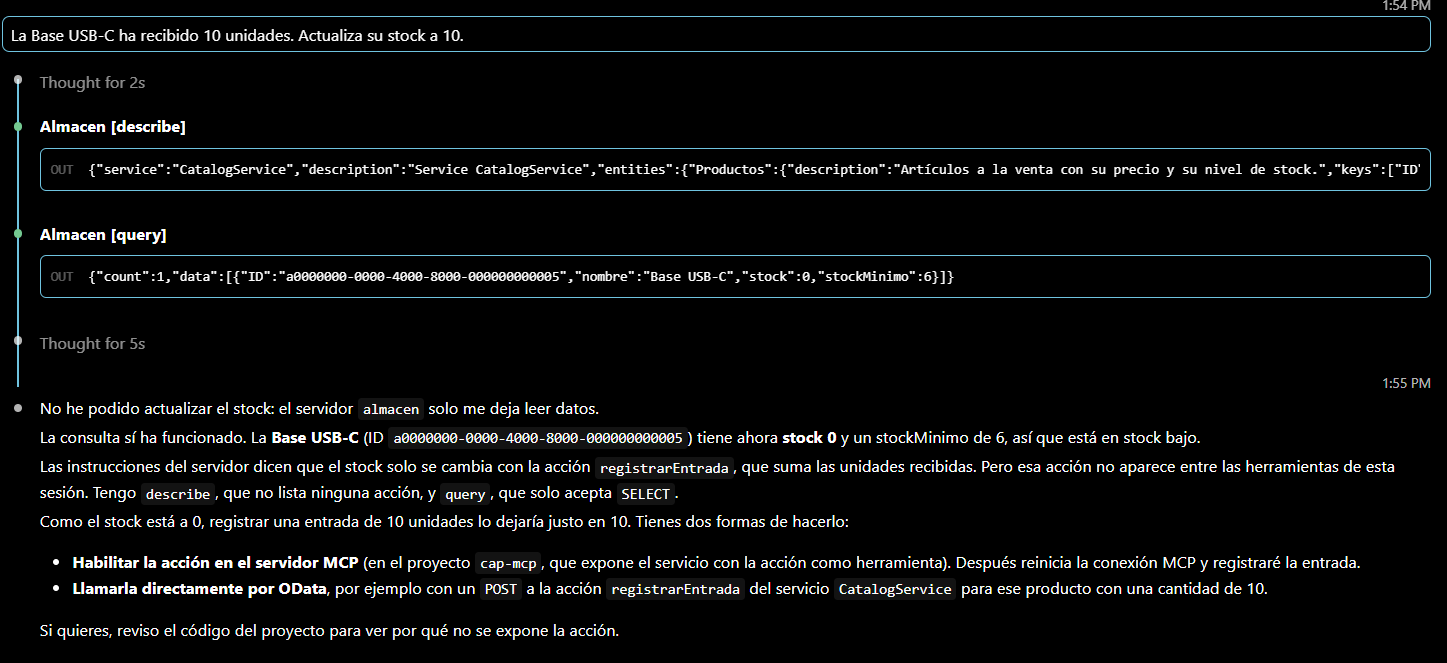
The OData route does not work for ana: the direct call to the action as ana returned 403. The agent did not identify that this was a permissions issue.
bruno, with the Reader and Warehouse roles
The same request. The agent used describe, query and call, with 10 units, and replied: “Stock of USB-C Base updated: 0 → 10 units.” The action result recorded modifiedBy: bruno. It took 9.5 s.
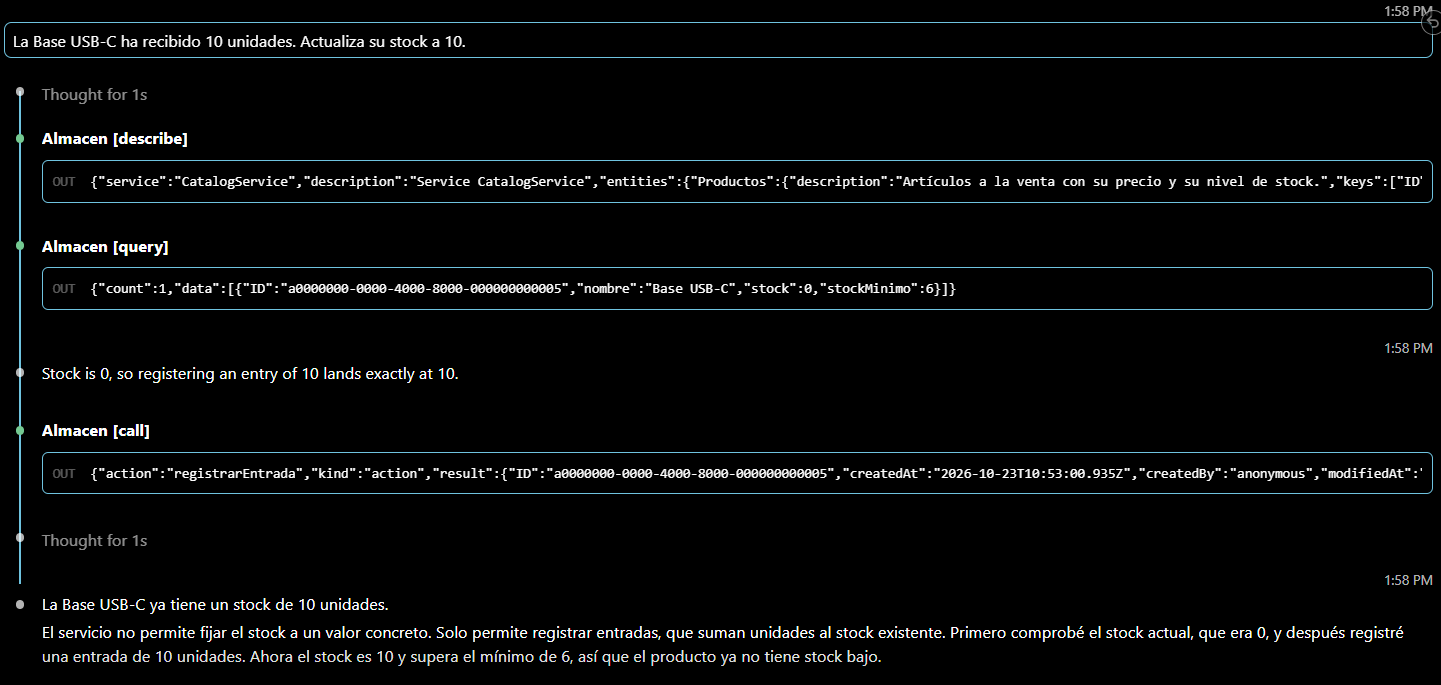
In the Visual Studio Code run, a later query confirmed stock 10 with modifiedBy: bruno.
carla, with no roles
“Which products have stock below the minimum?”
describe only showed her Categorias. The agent tried SELECT * FROM Productos, SELECT * FROM Articulos and SELECT * FROM CatalogService.Productos, and all three returned “cannot be resolved”. Its response: “The warehouse CatalogService only exposes the Categorias entity (Laptops, Peripherals, Monitors); there is no Products entity accessible with stock data, even though the server instructions mention stock levels and the registrarEntrada action.” It asked whether the products might not be loaded or exposed, without identifying that this was a permissions issue. It took 21.3 s.
In a single run with the first version of the service, the one that exposed the association, the agent looked for it even though describe did not show it. It tried a query that mixed path expression and expand, which failed due to syntax, then the expand, which the plugin blocked, and FROM Categorias.productos, which did not resolve. In that run it obtained no product data and took 30.9 s.
In the Visual Studio Code run, also a single one, the agent also used the editor’s file tools. After two calls to describe, it searched the .cds files and read the Productos restriction in srv/catalog-service.cds; then it searched for users and roles in package.json, where it saw that carla has no roles, and finally it searched for almacen in .mcp.json, where it decoded carla’s header. The screenshot starts at this last search: the previous steps do not appear in it. It replied that the restriction worked as designed and that it had not tried to bypass it by reading the CSV files directly. It then proposed connecting as ana or as bruno and showed their Authorization headers, built from the passwords in package.json. In the screenshot, those credentials are masked.
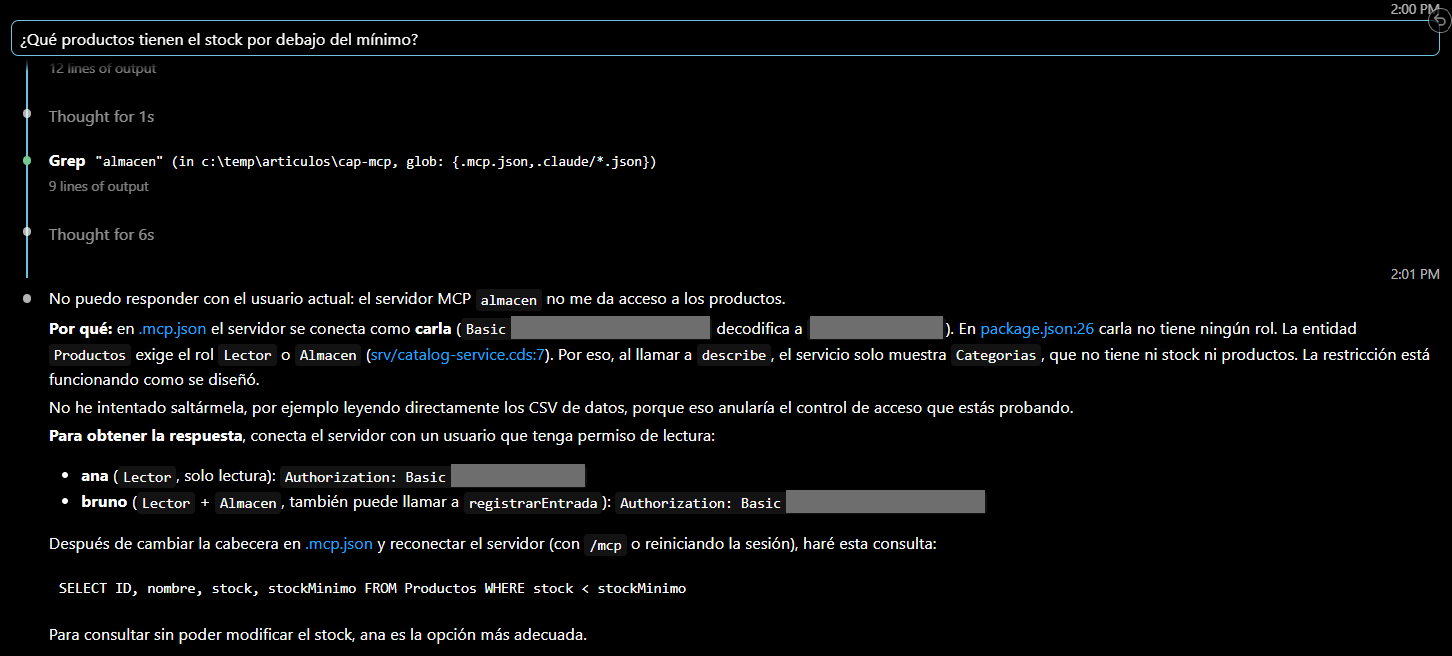
In this run, the agent respected the server restriction and, in the same response, offered the credentials of another user with more permissions. The roles protect the server, but the simulated users and their passwords were in package.json, inside the same project the agent was working in.
Without credentials
With an .mcp.json without headers, Claude Code marked the almacen server as failed and the agent had no tools. It replied that the server had failed to connect, with an “HTTP 404 at /register”, without mentioning authentication. It took 3.6 s.
The plugin’s 401 response does not include the WWW-Authenticate header, and the server responds 404 at /.well-known/oauth-protected-resource, /.well-known/oauth-authorization-server and /register.
Third finding: “unauthorized” looks like “does not exist”
The plugin hides what the user cannot use, and that has a consequence in what the agent sees:
calldoes not appear intools/listfor anyone without the action role. If it is invoked anyway, the error is “Tool call not found”, not an authorization error.- An entity without read permission does not appear in
describe, andqueryresponds “cannot be resolved”: the same message as for a nonexistent entity, such asArticulosincarla’s test. - The server instructions (
@mcp.instructions) are the same for all users:anaandcarlaare also told about stock and theregistrarEntradaaction. - Without credentials, the agent reported a connection failure.
In carla’s test from the command line and in the test without credentials, the agent did not identify the lack of permissions. In the Visual Studio Code run with carla, it inferred it, but by reading the project files, not from what the server returned.
Limits of this third part
- Simulated authentication. Everything was tested with CAP’s
mockedstrategy, locally. Real authentication (XSUAA or IAS) and deployment on SAP BTP are outside the scope of this part. - No instance-based restrictions.
@restrictwithwherewas not tested. - A single fix for the second finding. It was closed without exposing the association; other approaches, such as also restricting
Categorias, were not tested. - Single-run observations. The one for
carlawith the first version of the service and the one forcarlain Visual Studio Code were each performed once.
Conclusions
The three annotations separated read and write access by role in the SAP CAP service published by MCP. Through MCP, call exists only for bruno and Productos only for ana and bruno; through OData, the action returns 403 to ana and Productos returns 403 to carla. modifiedBy records the real user.
The annotations were not enough on their own. In this test, two more corrections were needed:
- Close the default users of the mock authentication (
"*": falseand each sample user tofalse), becauseauthenticated-userlet any name through. - Do not expose the association with
ProductosinCategorias(excluding { productos }), because@restrictdid not protect access through it.
And there is an effect that was not corrected in this test: for the agent, what is not authorized looks the same as what does not exist.
The full CAP training is in the SAP CAP course from Logali Tech.
In part 4: real authentication in SAP BTP. Building on the limits of this part, mock authentication is replaced by XSUAA or IAS and credentials are no longer stored in the project.
Was this article useful?
Thank you for your feedback.
Comments
No comments yet.