SAP CAP as an MCP server: one annotation and three surprises
How to expose a SAP CAP service as an MCP server with the @cap-js/mcp plugin, which tools the AI agent receives and what limits appear when you test it.
By Roger Alex Bostan 11 min read
Publishing a SAP CAP service for an AI agent costs one annotation. With SAP’s official @cap-js/mcp plugin, the line @protocol: ['odata', 'mcp'] serves the same service over OData and over Model Context Protocol (MCP), without writing any server code. In testing, the agent answered business questions in Spanish correctly with CQL queries it built itself.
The obvious thing would be to call the job done there. Testing revealed three surprises worth knowing before using it:
- The plugin modifies Claude Code’s global configuration. In the development profile, by default it writes its entry to
~/.claude.json, if that file exists, and deletes it when the server stops. - The agent does not see everything documented in the model. The
/** ... */comments and@titlewith literal text do not reach thedescribetool, even though the official documentation says they are used. - The agent proposes an approach that does not work. When faced with a write request it correctly refused, but it suggested a
PATCHover OData that the service rejects with a 405.
This article opens a series on SAP CAP and AI agents with MCP. This first part sets up a demo service, publishes it over MCP, explains each surprise and what to do about it, and sets the limits of the reading. All tests were run locally, on 06-10-2026 and 07-10-2026, with made-up data.
Test environment
| Component | Version |
|---|---|
| Node.js | 24.19.0 |
| npm | 11.17.0 |
@sap/cds-dk (global) | 10.1.2 |
@sap/cds | 10.1.1 |
@cap-js/mcp | 1.5.0 |
@cap-js/sqlite | 3.1.1 |
express | 5.2.1 |
| Claude Code (MCP client) | 2.1.276, model claude-sonnet-5 |
The @cap-js/mcp plugin is published by SAP’s CAP team at github.com/cap-js/mcp, under the Apache 2.0 license. Its official documentation is the Model Context Protocol Adapter guide. The README of package 1.5.0 still links to an earlier address that returns a 404.
Test architecture: the same service is served simultaneously over OData and over MCP.
flowchart TB
  A["AI agent (Claude Code)"] --> B["MCP server: /mcp/catalog"]
  C["OData client"] --> D["OData: /odata/v4/catalog"]
  B --> E["CatalogService"]
  D --> E
  E --> F["In-memory SQLite"]
From the CAP project to the MCP server
Project creation
cds init cap-mcp
cd cap-mcp
npm i @cap-js/mcp @sap/cds express
npm i -D @cap-js/sqlite
With @sap/cds-dk 10.1.2, cds init does not generate package.json: it is created by the first npm i with the dependencies. The project name, the start and watch scripts and the cds section are added afterwards by hand.
Data model
The model is a warehouse with two entities. The @description annotations play an important role, as will be seen later: they are what the agent reads to understand each field.
namespace demo.almacen;

using { cuid, managed, Currency } from '@sap/cds/common';

@description: 'Familias de productos del almacén.'
entity Categorias : cuid {
  nombre    : String(60) @mandatory;
  productos : Association to many Productos on productos.categoria = $self;
}

@description: 'Artículos a la venta con su precio y su nivel de stock.'
entity Productos : cuid, managed {
  nombre       : String(100) @mandatory;
  descripcion  : String(500);
  categoria    : Association to Categorias;
  precio       : Decimal(9, 2)  @description: 'Precio unitario sin impuestos';
  moneda       : Currency;
  stock        : Integer default 0 @description: 'Unidades disponibles en el almacén';
  stockMinimo  : Integer default 0 @description: 'Umbral de reposición: por debajo de este valor hay que pedir más unidades';
}
The test data, in db/data/*.csv, consists of 3 categories (Laptops, Peripherals and Monitors) and 7 products with prices in euros. Three products are below the minimum stock: USB-C Dock (0 of 6), 16-inch Laptop (3 of 4) and Mechanical Keyboard (8 of 10).
The service: one annotation
using { demo.almacen as db } from '../db/schema';

@protocol: ['odata', 'mcp']
service CatalogService {
  @readonly entity Productos  as projection on db.Productos;
  @readonly entity Categorias as projection on db.Categorias;
}

annotate CatalogService with @mcp.instructions: 'Catálogo de productos de un almacén de demostración. Usa describe para conocer las entidades y query para consultar productos, categorías y niveles de stock. Un producto tiene stock bajo cuando stock < stockMinimo.';
The only new line compared to a normal CAP service is @protocol: ['odata', 'mcp']. With it, the service is published over MCP under the /mcp/ prefix (here, /mcp/catalog), in addition to OData. The @mcp.instructions annotation is optional: its text reaches the agent as server instructions during protocol initialization, which was verified in the response to initialize.
Startup
[cds] - serving CatalogService {
  at: [ '/odata/v4/catalog', '/mcp/catalog' ],
  decl: 'srv\\catalog-service.cds:4',
  impl: 'node_modules\\@sap\\cds\\srv\\app-service.js'
}
[cds] - server listening on { url: 'http://localhost:4004' }
[cds] - server v10.1.1 launched in 2309 ms
The first startup, cold, took 30.4 s. Subsequent reloads after changing the model took between 1.8 and 2.1 s, and the startup with npx cds watch on 2026-10-07, 2.3 s.
Autowire: the plugin modifies Claude Code’s global configuration
Before connecting the agent, it is worth reviewing a default behavior of the plugin. In the development profile, @cap-js/mcp registers the server on its own in the clients it finds:
- it writes the server entry (key
cds:CatalogService) into~/.claude.json, the Claude Code user’s global configuration, if that file already exists; - it does the same in the OpenCode configuration, if it exists;
- it deletes the entry when the server stops.
The code is in lib/clients.js of the package. It is convenient, but it touches a global user file that affects all their projects. In this test it was disabled in package.json:
"cds": {
  "mcp": { "autowire": false }
}
and the server was registered only for the project, with a .mcp.json file at its root:
{
  "mcpServers": {
    "almacen": {
      "type": "http",
      "url": "http://localhost:4004/mcp/catalog"
    }
  }
}
The MCP tools the agent receives
The plugin does not publish one tool per entity, but rather two generic tools:
| Tool | What it does |
|---|---|
describe | Returns the service model: entities, fields, types, descriptions and actions. |
query | Executes a CQL statement. It only supports SELECT. |
If the service has actions or functions, the plugin adds a third tool, call. The official documentation presents all three together, but in this service, with no actions, tools/list returned only describe and query.
The description of query tells the agent to first use describe to learn the fields, and explains that CQL supports path expressions to follow associations without writing JOINs.
Direct test with curl
Before using the agent, the protocol was tested with curl. This query follows the categoria association with a path expression:
SELECT nombre, stock, stockMinimo, categoria.nombre as categoria FROM Productos WHERE stock < stockMinimo ORDER BY stockThe response arrives in TOON format, compact for language models:
count: 3
data[3]{nombre,stock,stockMinimo,categoria}:
  Base USB-C,0,6,Periféricos
  Portátil 16 pulgadas,3,4,Portátiles
  Teclado mecánico,8,10,Periféricos
A DELETE FROM Productos sent to query is rejected before reaching the database, during CQL compilation:
Error executing CQL: CDS compilation failed
In 'DELETE FROM Productos' at 1:1-7: Error: Mismatched ‹Identifier›, expecting ‘(’, ‘select’
Reading is safe by design: with query you cannot write. To write, you have to expose CDS actions, which the agent invokes with the call tool.
What descriptions reach the agent
The agent only knows about each field what describe returns to it, and in this version not all the ways of documenting the model reach that output. This was verified on 2026-10-07 against a copy of the project:
| Way of documenting | Appears in describe |
|---|---|
@description on entities and fields | Yes |
@title with i18n key ('{i18n>NombreProd}') | Yes |
@title with literal text | No |
Documentation comments /** ... */ | No, not even with "cdsc": { "docs": true } |
The “Created On” and “Changed On” descriptions that appear on the managed fields come precisely from @title with an i18n key. The official documentation states that documentation comments are used as well, but in this test they did not appear.
The most reliable approach is to describe with @description the fields whose meaning is not obvious. In the test model, the clear case is stockMinimo: without the description, the agent only sees an integer.
Three questions in natural language
With the server running and registered in .mcp.json, three questions were asked in Spanish to Claude Code. The traces of each run were saved in full.
Question 1: products below minimum
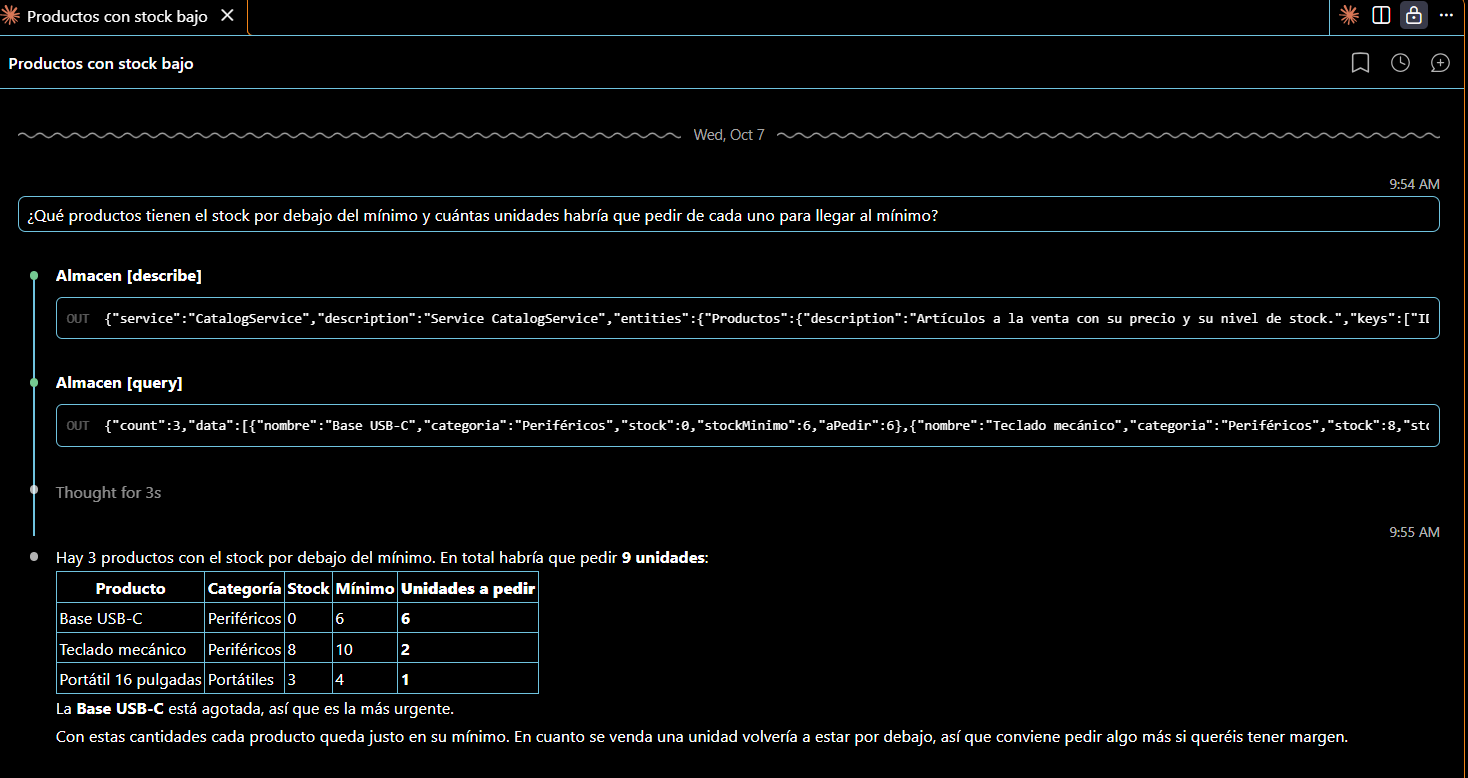
“What products have stock below the minimum and how many units would need to be ordered for each one to reach the minimum?”
The agent called describe for the Productos entity and then built the query itself:
SELECT from Productos { ID, nombre, stock, stockMinimo } where stock < stockMinimo order by nombre| Product | Stock | Minimum | Units to order |
|---|---|---|---|
| USB-C Base | 0 | 6 | 6 |
| 16-inch laptop | 3 | 4 | 1 |
| Mechanical keyboard | 8 | 10 | 2 |
Correct answer, in 7.7 s.
In a second run with the same question and the same data, in the Claude Code extension for Visual Studio Code, the agent calculated the units to order in the query itself (column aPedir), added the category and gave the total: 9 units. The figures for each product match those of the first run and the test data.
Question 2: inventory value by category
“What is the total inventory value (price times stock) in each category? Sort it from highest to lowest.”
The agent queried describe for Productos and Categorias, and generated a query with a path expression and an aggregation:
SELECT categoria.nombre as categoria, sum(precio * stock) as valorTotal FROM Productos GROUP BY categoria.nombre ORDER BY valorTotal DESC| Category | Total value (EUR) |
|---|---|
| Laptops | 15,285 |
| Monitors | 3,401 |
| Peripherals | 2,057.5 |
The figures were verified by hand:
- Laptops: 899 × 12 + 1499 × 3 = 15,285.
- Monitors: 329 × 7 + 549 × 2 = 3,401.
- Peripherals: 29.90 × 45 + 89 × 8 + 119 × 0 = 2,057.5.
Correct answer, in 8.8 s.
Question 3: a write request
“The USB-C Base has received 10 units. Update its stock to 10.”
In the first run, the agent called describe, located the product with a query and did not modify anything. It explained that query only supports SELECT and that there is no write tool, and proposed other approaches: the CAP application interface, a database administration tool or exposing a write action in the service. It took 14.5 s.
In the second run, in Visual Studio Code, the answer was essentially the same, but the agent first searched the project files and proposed three specific alternatives.
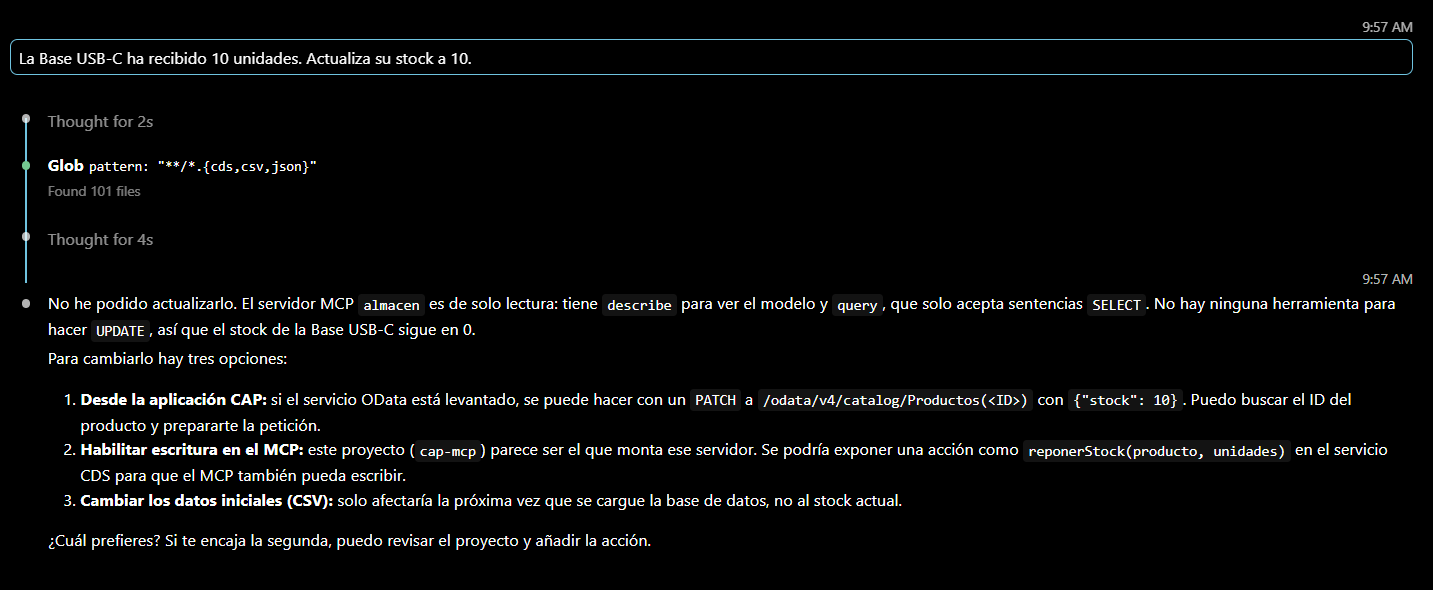
The first alternative, PATCH via OData, does not work in this service. The entities are projected with @readonly, so PATCH /odata/v4/catalog/Productos(<ID>) with {"stock": 10} returns 405 Method Not Allowed:
{"error":{"message":"Entity \"CatalogService.Productos\" is read-only","code":"ENTITY_IS_READ_ONLY","@Common.numericSeverity":4}}The stock of the USB-C Base remained at 0. The agent was right to refuse to write, but its first suggestion did not take @readonly into account. The Glob search shown in the screenshot is over the project files, not an MCP tool: in Visual Studio Code the agent also sees the code, not just the MCP server.
What the three questions show
- In all three questions, the agent first used
describeto learn the fields and then wrote the query itself. - The agent uses CAP CQL, including path expressions through associations (
categoria.nombre) and aggregations withGROUP BY. - With the same data, the shape of the answer changes between runs (query, columns, total), although the figures stay the same.
- The suggestions that the agent has not executed must be checked, as the rejected
PATCHdemonstrates.
Limits of this first part
- Read only.
querydoes not write, and the service is marked@readonly. Controlled writing through actions is the topic of the next installment. - Simulated authentication. Locally, CAP uses
mockedauthentication. Authentication and roles are left for a later part of the series. - No deployment. Everything has been tested locally; deployment to SAP BTP is outside the scope of this part.
Conclusions
Publishing a SAP CAP service as an MCP server costs one annotation, @protocol: ['odata', 'mcp'], and from that moment on the agent can answer business questions with CQL queries that it builds itself. What requires attention is not the plugin, but what surrounds it:
- Disable
autowireif you do not want the plugin to modify Claude Code’s global configuration, and register the server per project with.mcp.json. - Document with
@descriptionthe fields that the agent cannot interpret by their name. - Review what the agent proposes and has not executed.
To review the CAP fundamentals used in this article, the blog covers how the CDS model and the services are separated and when handlers in Node.js are needed. The complete CAP training is in the SAP CAP course by Logali Tech.
In part 2: secure writing through CDS actions. Based on the limitation seen in question 3, an action is exposed in the service so that the agent can modify the stock with the call tool, in a controlled way.
Was this article useful?
Thank you for your feedback.
Comments
No comments yet.