Enabling extensibility (key user) in SAP S/4HANA 2025
Steps to enable the key user extensibility apps in SAP S/4HANA 2025: SAP Note, ATO, SAP_BASIS_BC_EXT catalog, ICF nodes, OData services and role.
By Grecia Rodriguez 10 min read
The starting point was a client request: their key users needed to be able to work with the extensibility apps (Custom Fields, Custom Logic, Custom CDS Views, etc.) in the Fiori Launchpad of SAP S/4HANA 2025. These apps do not become operational just by assigning a catalog. The key condition is having the Adaptation Transport Organizer (ATO) configured: without it, the apps cannot save anything and show errors indicating that the ATO is not configured. Around the ATO, an SAP Note, the catalog, the ICF nodes, the OData services and a role are also required.
This guide collects the steps performed, in order, to make the extensibility apps available and working.
Summary of the steps in SAP S/4HANA 2025
| # | Step | Tool |
|---|---|---|
| 1 | Apply SAP Note 2283716 | SNOTE |
| 2 | Configure the Adaptation Transport Organizer (ATO) | Setup Adaptation Transport Organizer for Key User Tools screen |
| 3 | Copy the standard business catalog SAP_BASIS_BC_EXT | /n/UI2/FLPCM_CUST |
| 4 | Activate ICF nodes and OData services for each app | SICF and /IWFND/MAINT_SERVICE |
| 5 | Create the space and the page, and create the role with the catalog and the space | Launchpad and PFCG |
| 6 | Verify in the Launchpad | Fiori Launchpad |
1. Apply SAP Note 2283716
The SAP Note 2283716 is required to use the apps in the standard business catalog SAP_BASIS_BC_EXT (Extensibility).
This step is performed by the Basis team using transaction SNOTE.
2. Setup of the Adaptation Transport Organizer (ATO)
ATO allows key users’ extensions to be recorded in transports. It is configured on the screen Setup Adaptation Transport Organizer for Key User Tools.
Use and operation of ATO
The extensibility apps (Custom Fields, Custom Logic, Custom CDS Views, Custom Business Objects…) allow a key user to create development objects (fields, logic, CDS views) without using the ABAP Workbench. Those objects need, just like any development, a package, a prefix or namespace and a transport request to reach quality and production. Since the key user does not manage transports manually, this configuration provides all of that to the system in advance:
- It defines where the objects are created: local package and sandbox package where the extensions are stored.
- It defines how they are named: the prefix (
ZZ1_) is prepended to transportable objects and the sandbox prefix (ZZ9_) to test objects, avoiding collisions with SAP objects or your own development objects. - It enables automatic transport: ATO collects the extensions in transport requests (“adaptation transports”) that are then managed with the app Register Extensions for Transport.
- It separates testing from productive content: anything created in the sandbox is not transported.
Without this step, the extensibility apps cannot save anything and show errors indicating that ATO is not configured.
This step is carried out with the support of the Basis team.
Configuration used
| Field | Value |
|---|---|
| Setup type | Prefix setup |
| Local package | TEST_YY_KEY_USER_LOCAL |
| Sandbox package | TEST_YY_KEY_USER_SANDBOX |
| Namespace | (empty, disabled in prefix setup) |
| Prefix | ZZ1_ |
| Sandbox Prefix | ZZ9_ |
ATO can be configured with Setup with specific data, entering the packages and prefixes manually (the option followed in this article), or with Setup with default data, which applies the system’s default values.
Steps:
- Open transaction
S_ATO_SETUP. - Select Prefix setup.
- Enter the packages and prefixes as in the table.
- Press Setup with specific data.
- Check that AdaptationTransport Organizer configured = Yes (green indicator). The Details button shows the details.
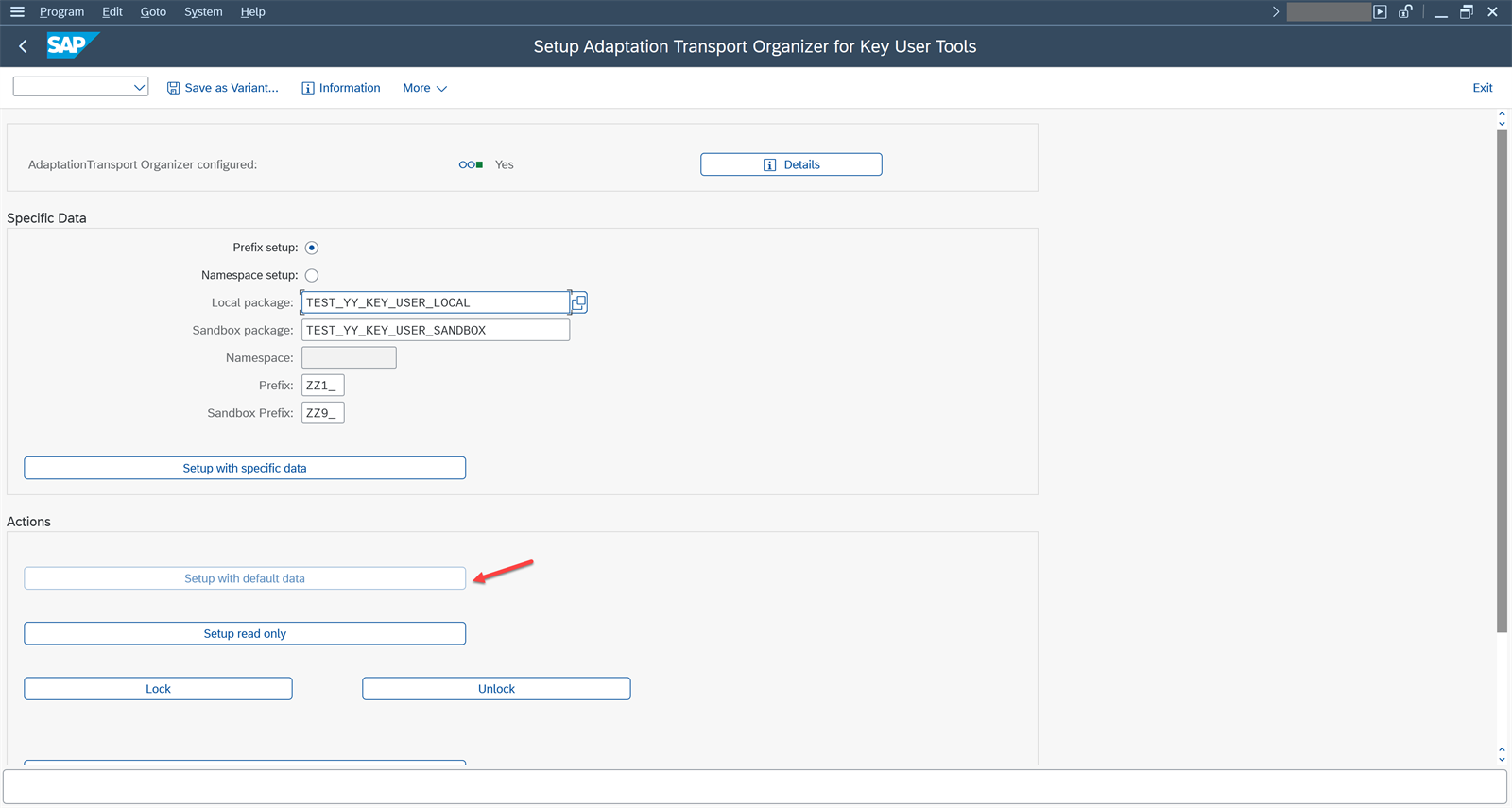
Note: once configured, the Setup with default data button becomes disabled (red arrow in the screenshot). This is the expected behavior: the setup was already done with specific data. The Lock and Unlock buttons allow you to lock or unlock the configuration, and Setup read only leaves the system in read-only mode.
3. Copy the SAP_BASIS_BC_EXT catalog
With transaction /n/UI2/FLPCM_CUST (Launchpad Content Manager, client-specific content) in S/4HANA version mode:
-
Open
/n/UI2/FLPCM_CUST.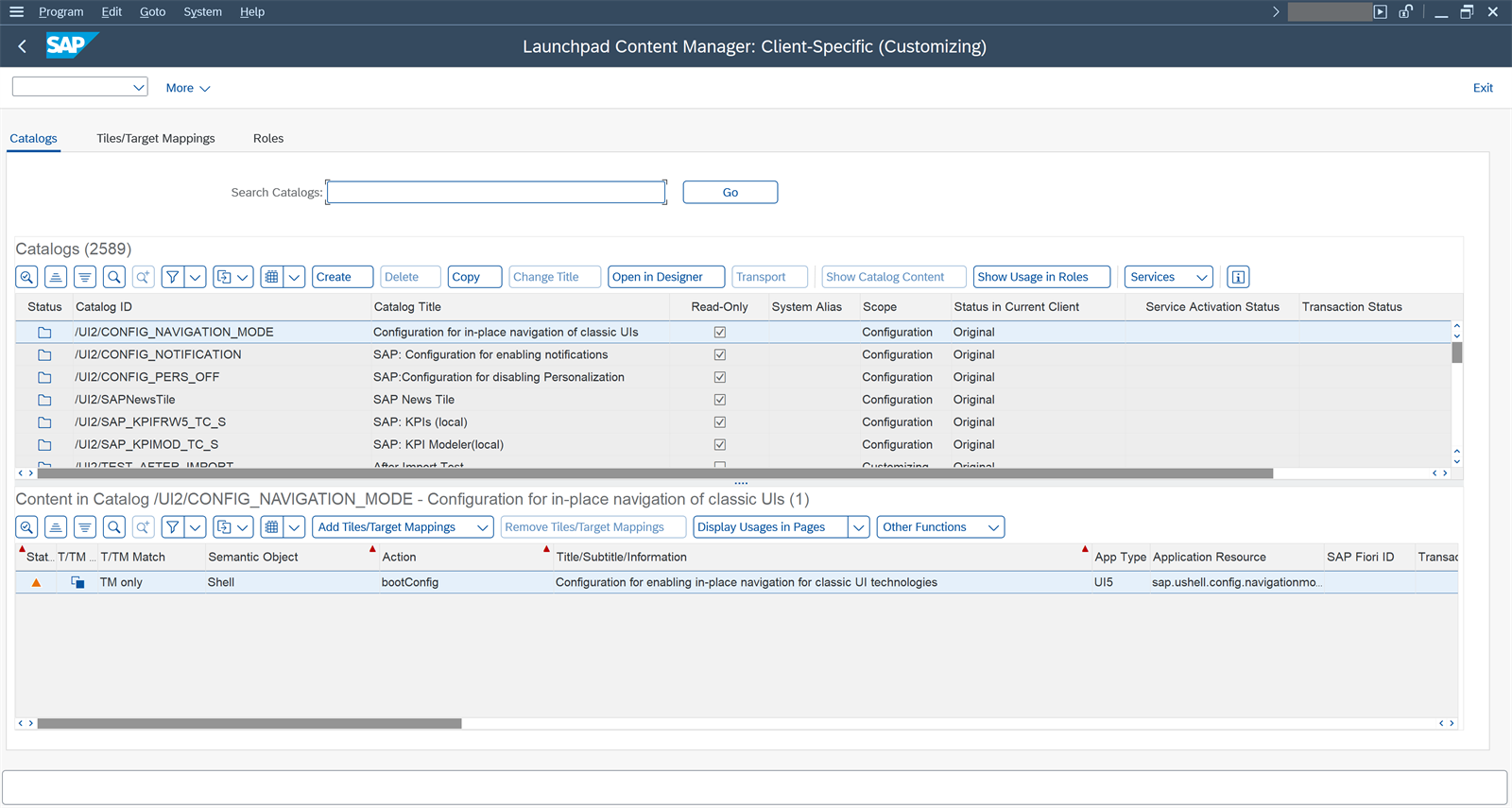
-
Select the standard catalog
SAP_BASIS_BC_EXTand copy it to the client scope (catalogZ...orY...).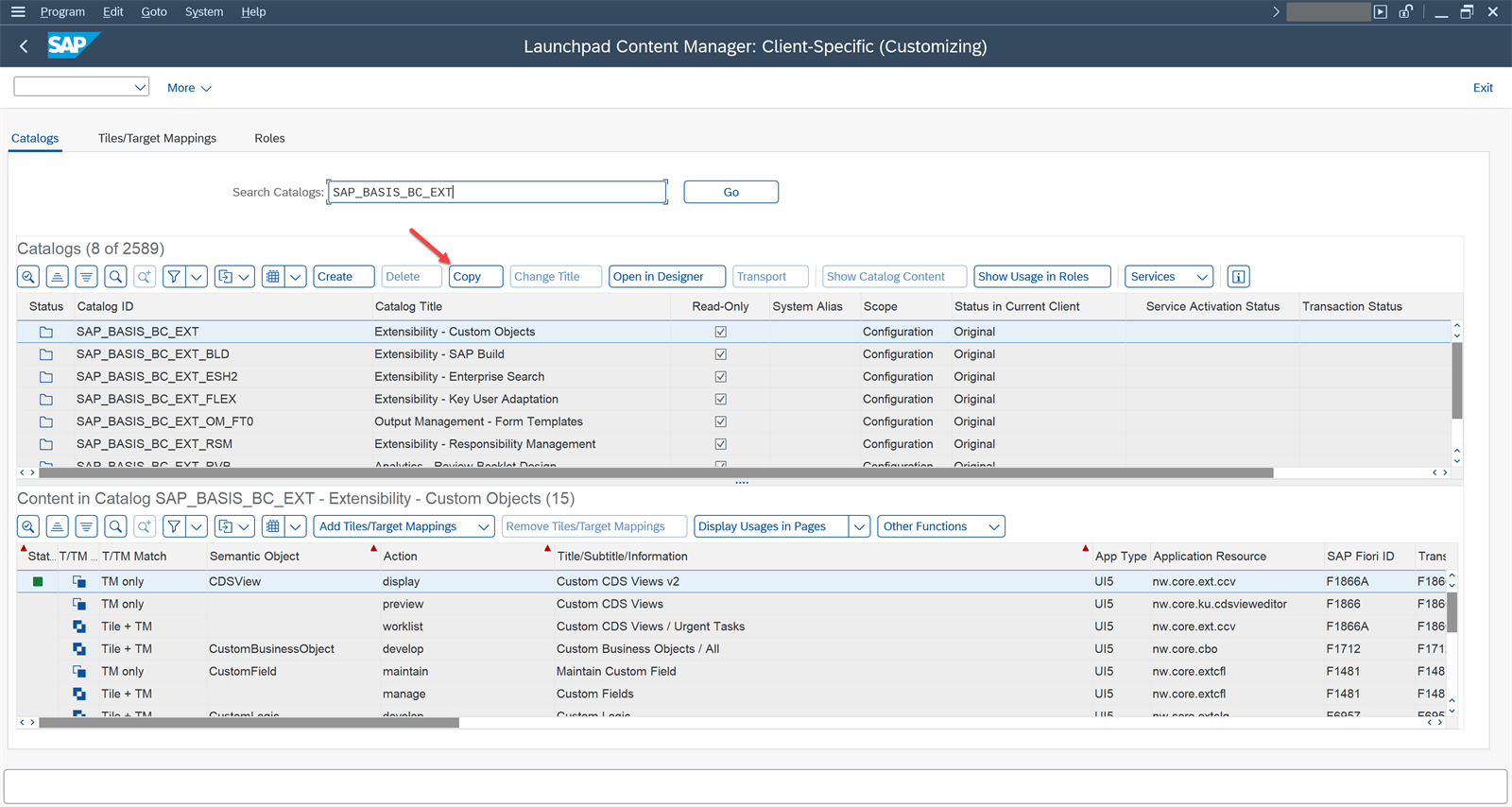
-
Create a customizing transport request and save the catalog copy in it.
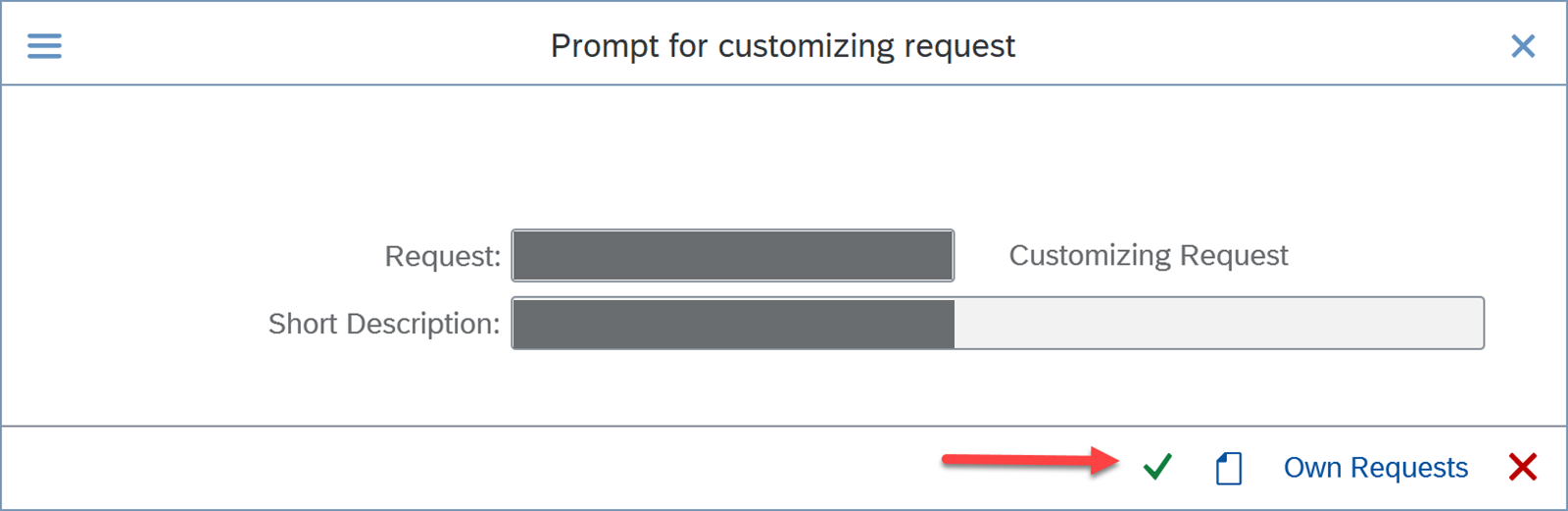
This catalog contains the extensibility tiles (see section 6).
4. Activate ICF nodes and OData services
For each app to open and load data, its services must be activated.
ICF nodes (transaction SICF)
-
Open SICF and search for the app’s service (path
/sap/bc/ui5_ui5/...or/sap/bc/ui2/...).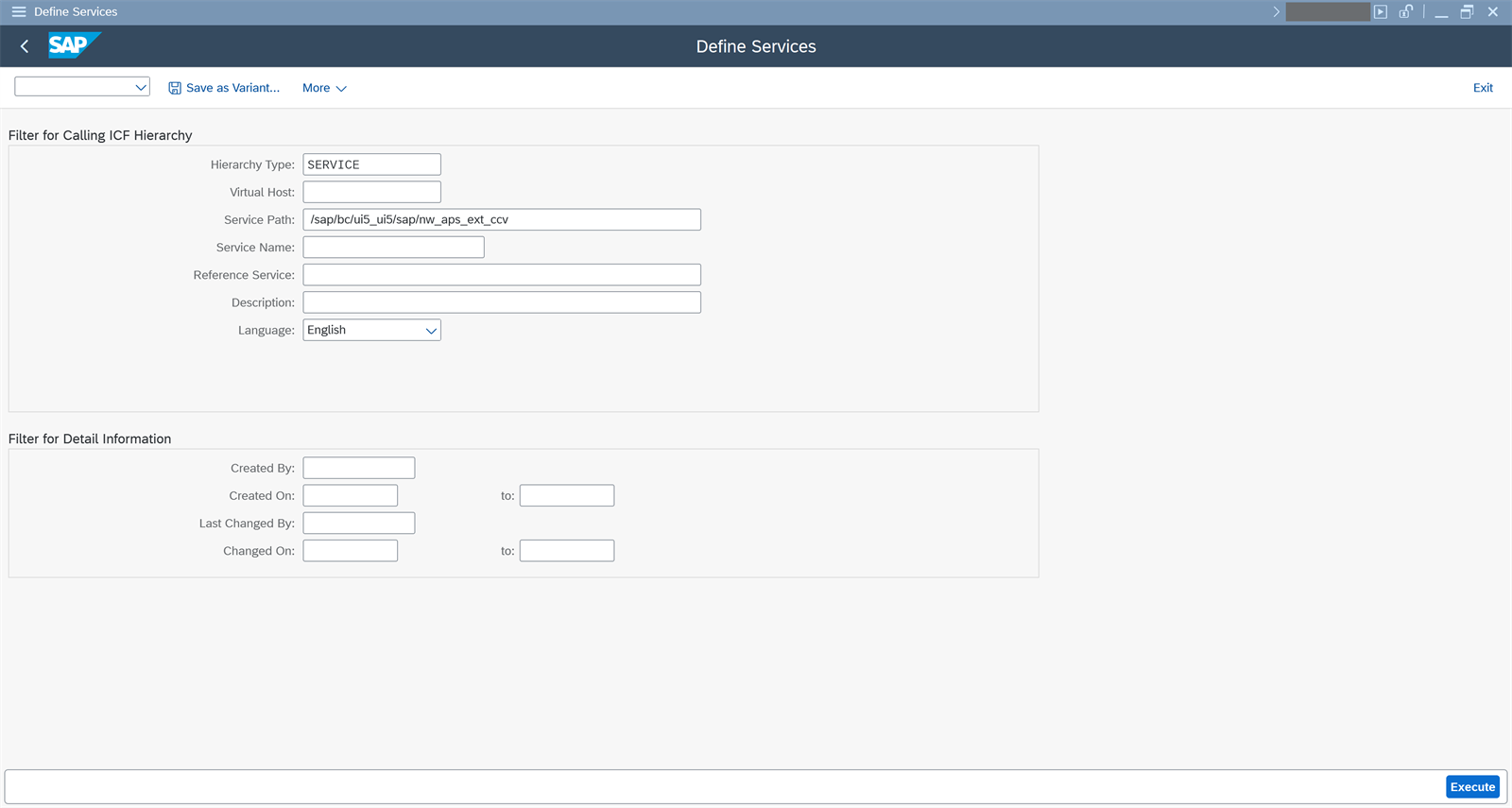
-
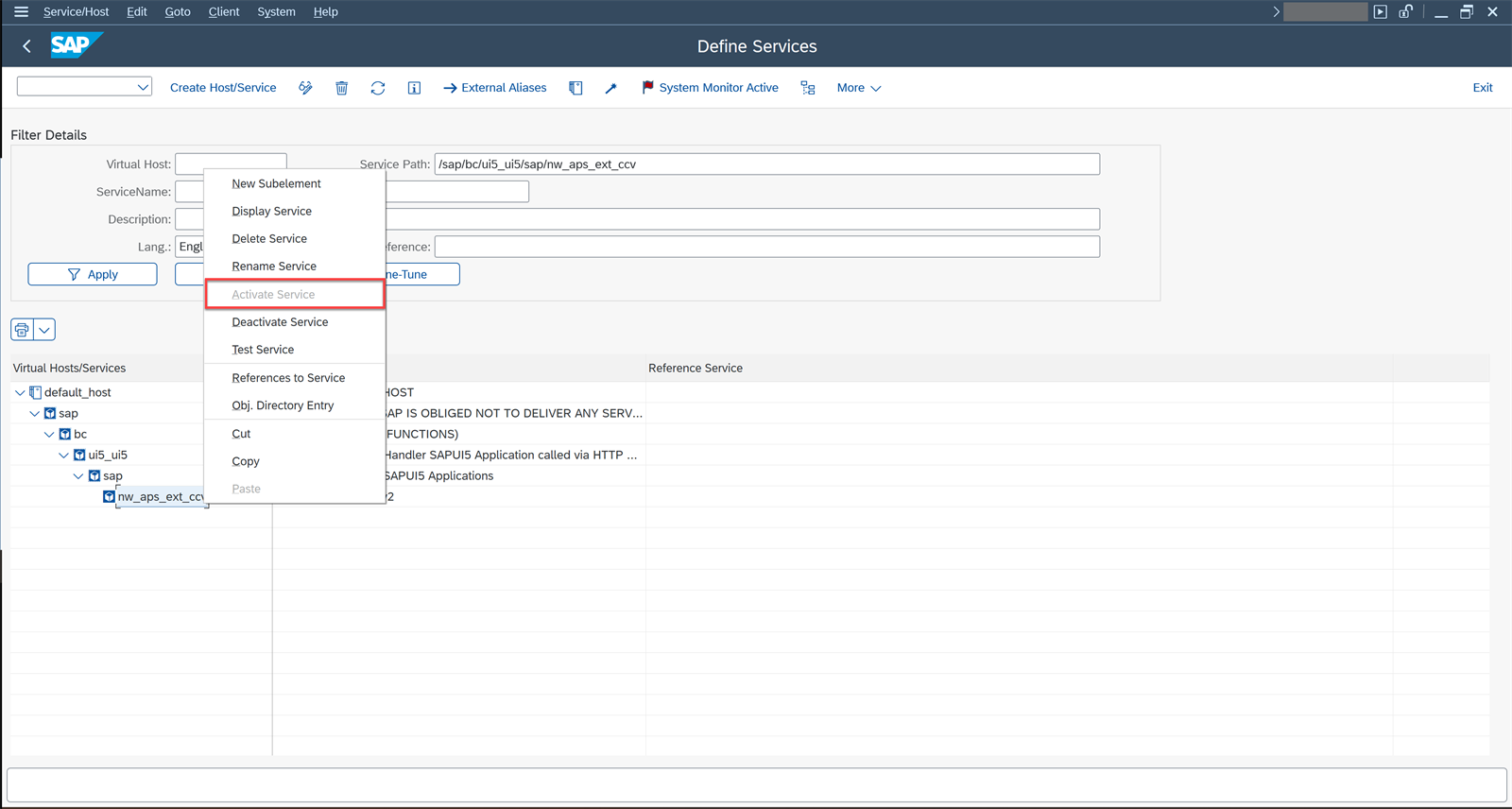
Right-click the node and choose Activate Service. If the option appears grayed out, the node is already active and there is nothing else to do.
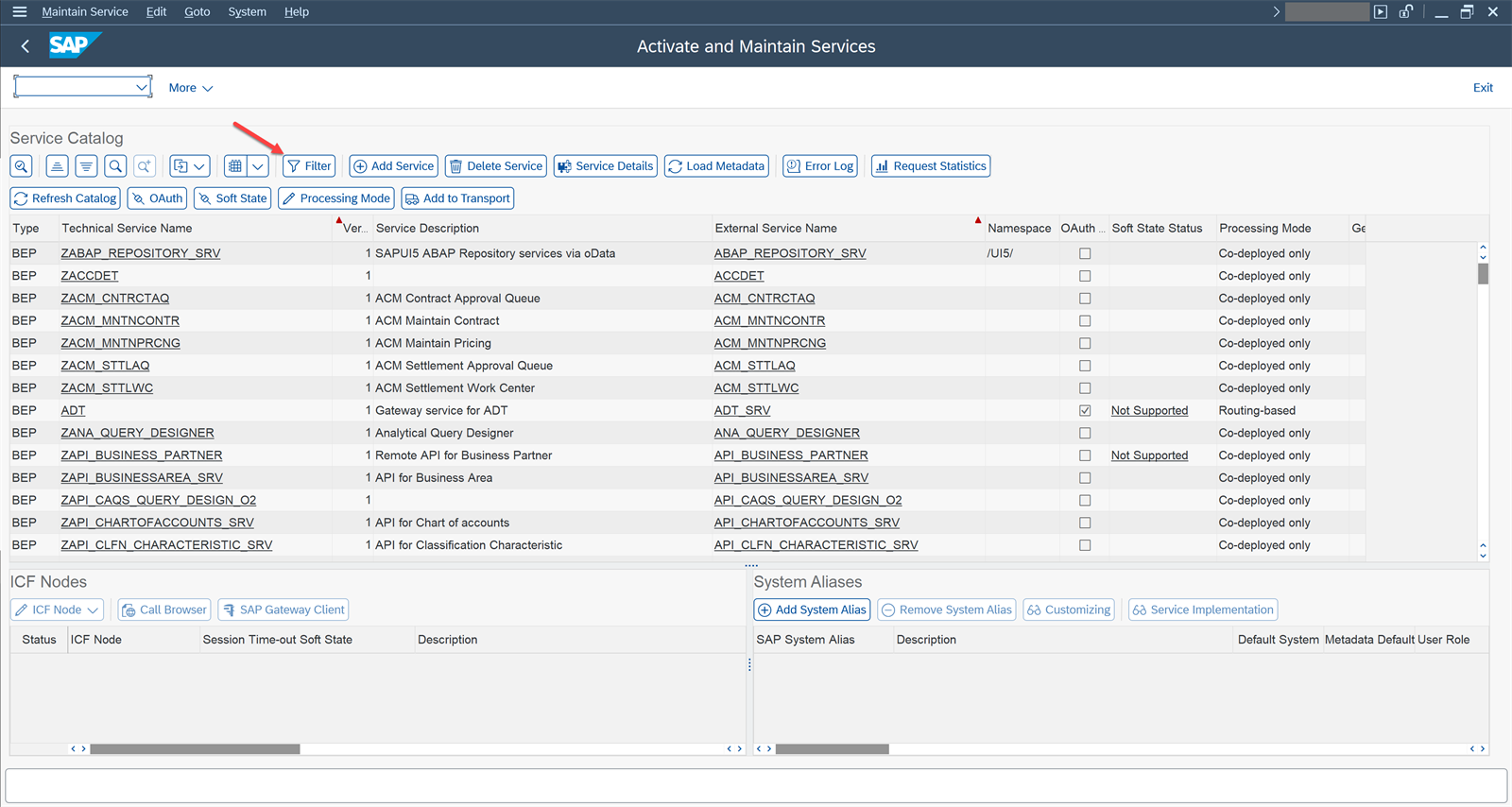
OData services (transaction /IWFND/MAINT_SERVICE)
At a general level, the steps are:
-
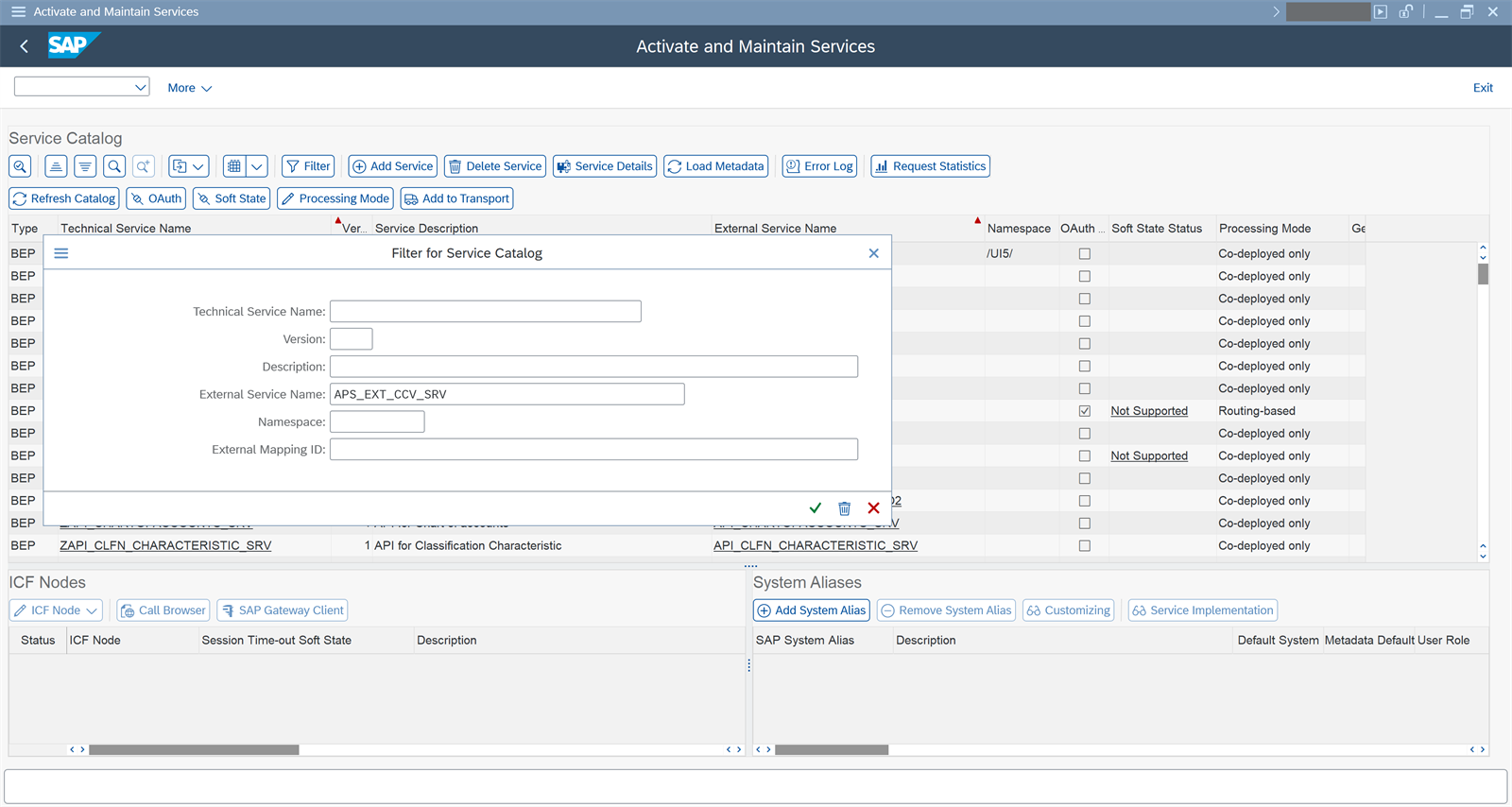
Use the filter to locate the OData service indicated in the app documentation (Fiori Apps Reference Library).
-
Verify the following:
- That the service is registered: if it appears in the list, it is already registered.
- That the OData service is active.
- That the System Alias is specified, provided the service is not co-deployed.
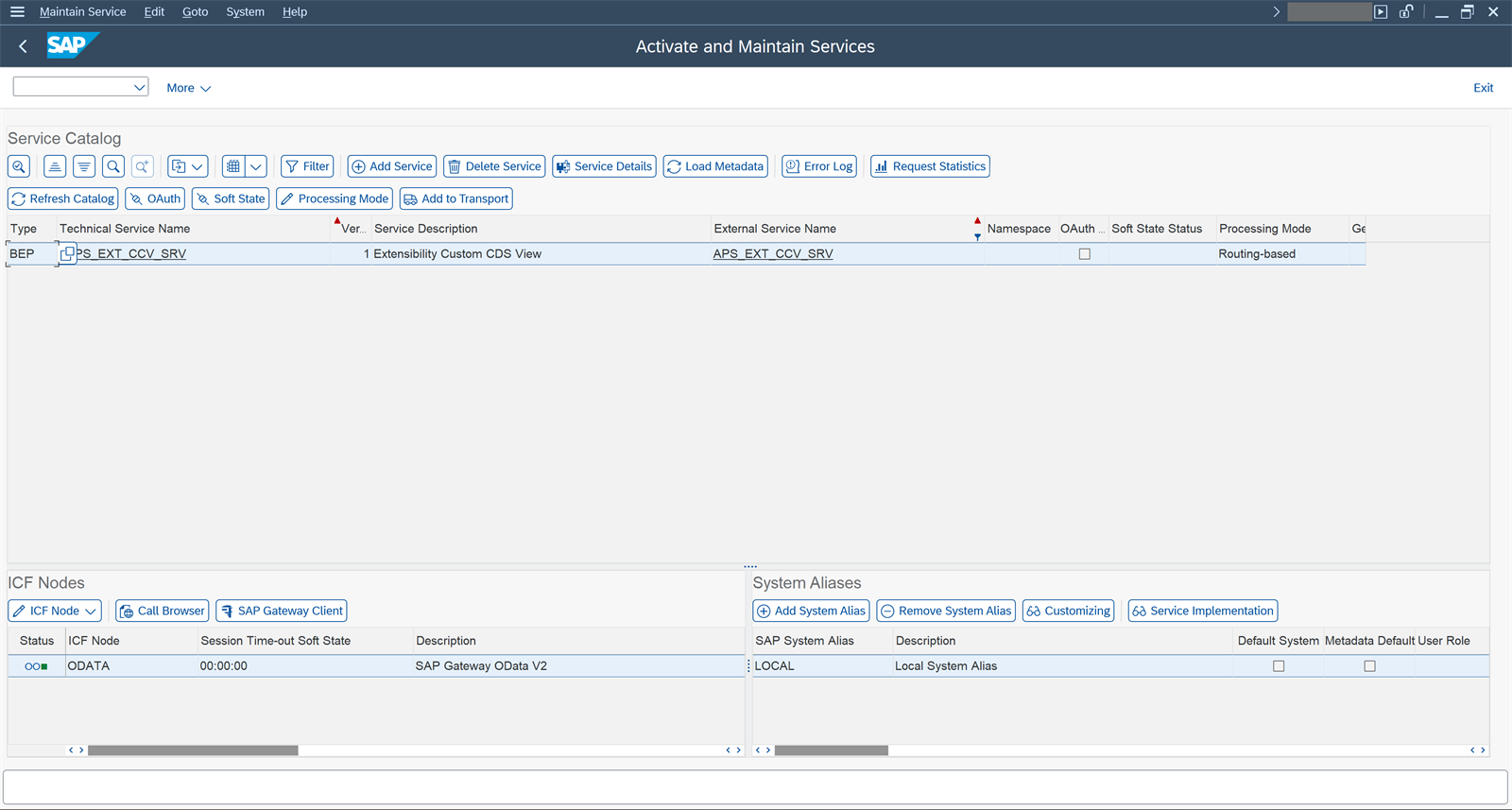
Note: if the service does not appear in the transaction, it must be added with Add Service.
Repeat for each application in the catalog:
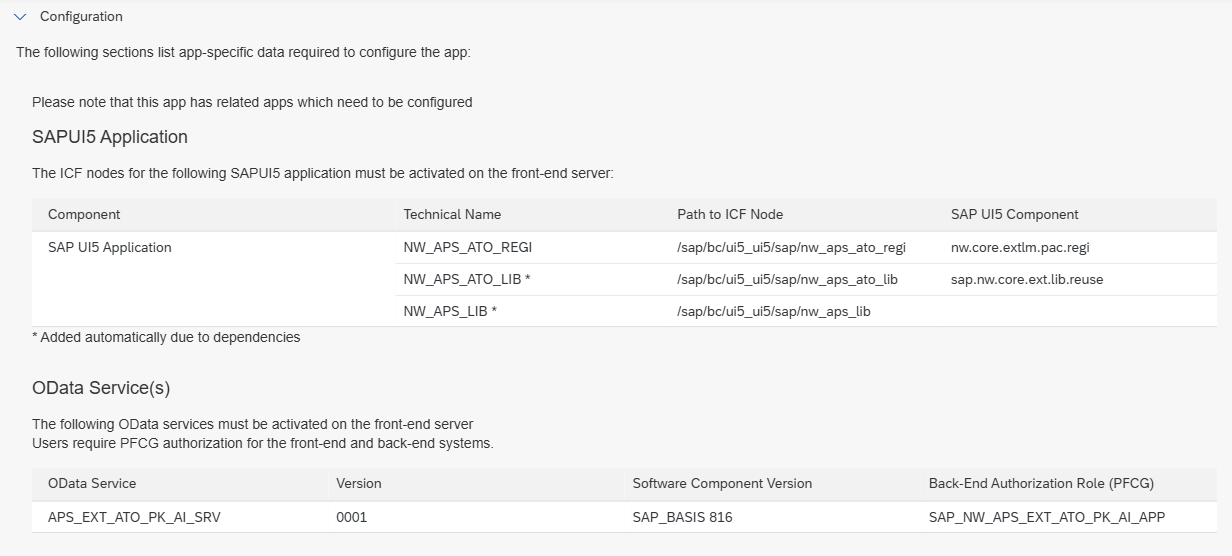
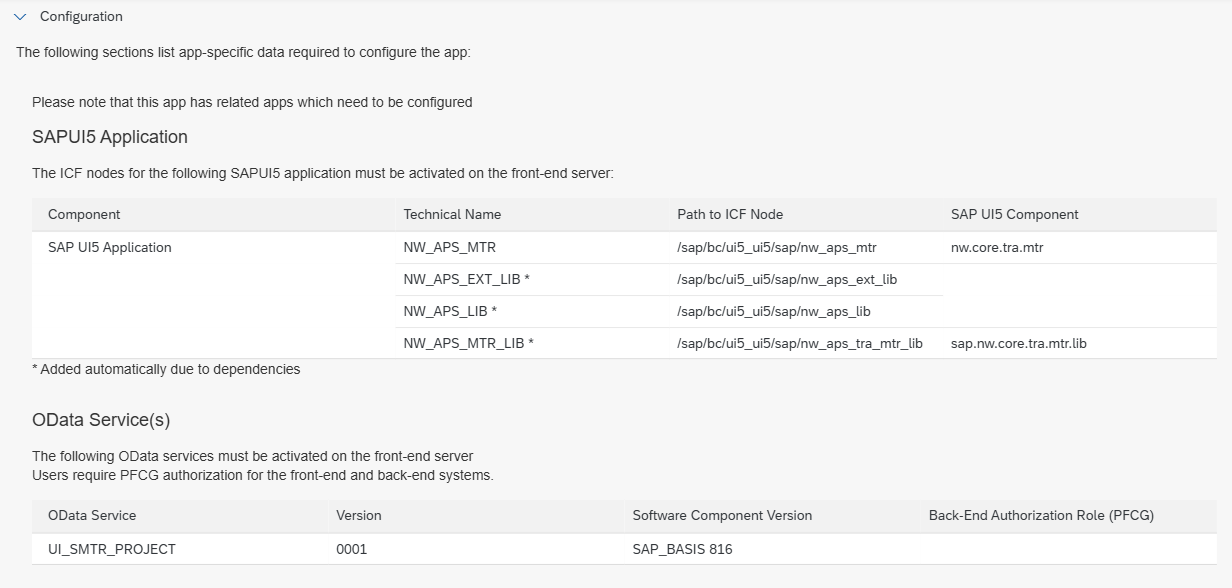
| App (tile) | ICF node (/sap/bc/ui5_ui5/sap/...) | OData service |
|---|---|---|
| Configure Software Packages | nw_aps_ato_conf | APS_EXT_ATO_PK_CFG_SRV |
| Custom Business Objects | nw_aps_cbo | APS_EXT_CBO_D_SRV, APS_EXT_AFT_SRV, APS_EXT_CCL_SRV |
| Custom CDS Views | nw_aps_ext_ccv | APS_EXT_CCV_SRV |
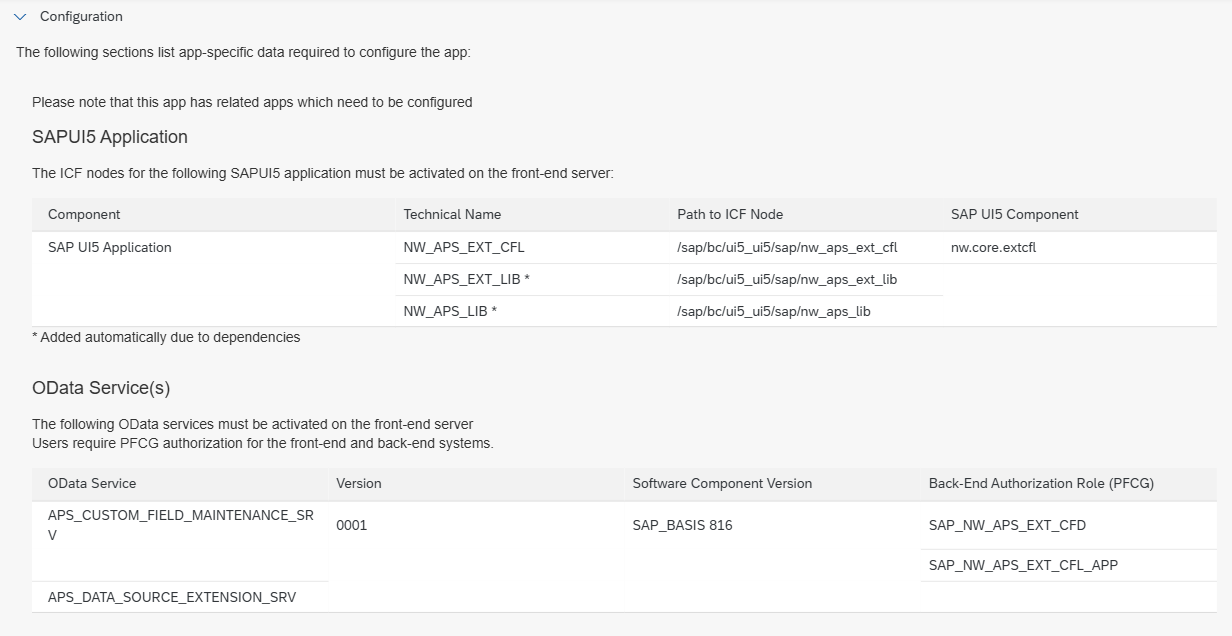
| Custom Fields (Custom Fields and Logic) | nw_aps_ext_cfl | APS_CUSTOM_FIELD_MAINTENANCE_SRV, APS_DATA_SOURCE_EXTENSION_SRV |
| Custom Logic (Custom Fields and Logic) | nw_aps_ext_cfl | APS_CUSTOM_FIELD_MAINTENANCE_SRV, APS_DATA_SOURCE_EXTENSION_SRV |
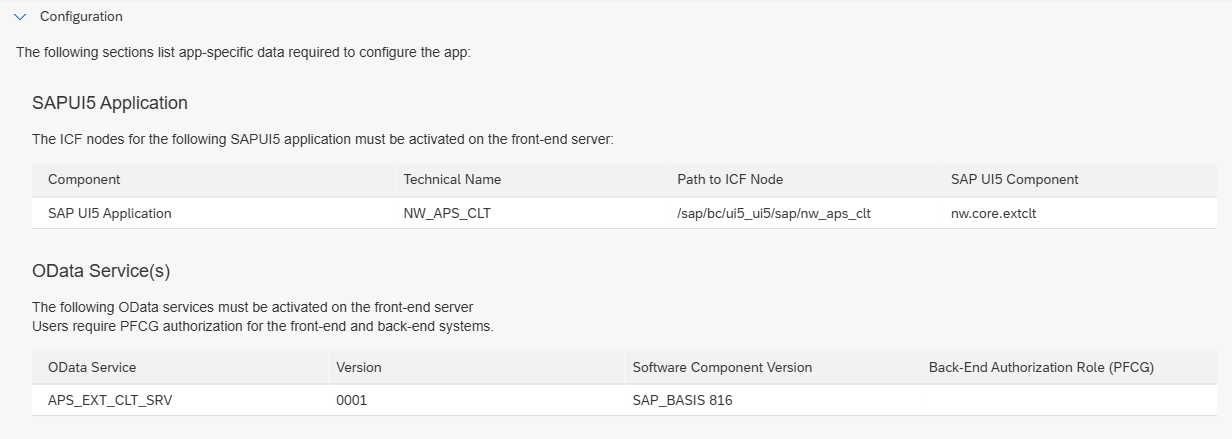
| Custom Logic Tracing | nw_aps_clt | APS_EXT_CLT_SRV |
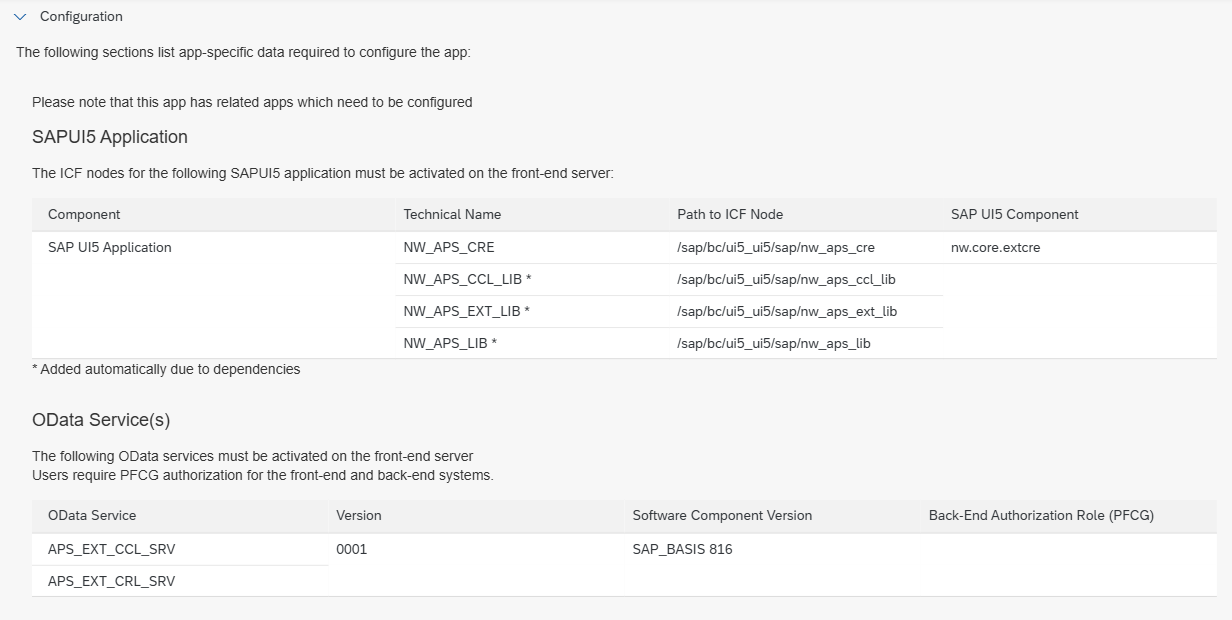
| Custom Reusable Elements | nw_aps_cre | APS_EXT_CCL_SRV, APS_EXT_CRL_SRV |
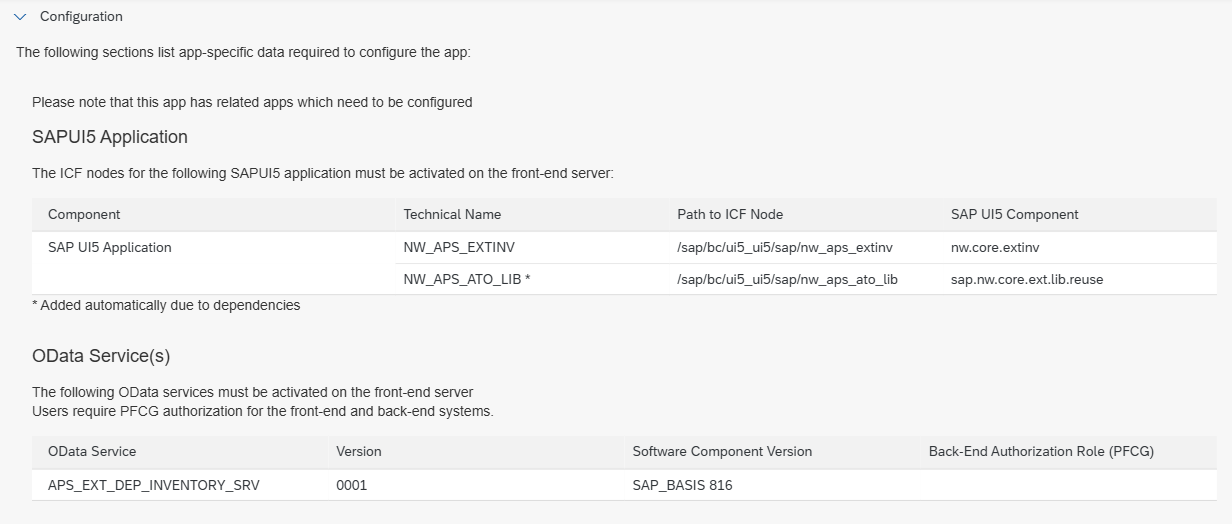
| Extensibility Inventory | nw_aps_extinv | APS_EXT_DEP_INVENTORY_SRV |
| Register Extensions for Transport | nw_aps_ato_regi | APS_EXT_ATO_PK_AI_SRV |
| Maintain Translations | nw_aps_mtr | UI_SMTR_PROJECT |
Fiori Apps Reference Library
- New library: fal.cloud.sap
- Classic library: fioriappslibrary.hana.ondemand.com (SAP is deprecating it and will discontinue it in December 2026; it redirects to the new one)
Purpose. It is SAP’s official catalog of all SAP Fiori apps. For each app it shows:
- Functional information: what it does, business role, application type and product version.
- Technical information for implementing it (Implementation Information tab): relevant SAP Notes, installation and configuration.
- Configuration data: ICF nodes, OData services, back-end PFCG roles and Launchpad technical configuration (catalog, semantic object, target mapping).
- Related apps and comparison across product versions.
In this guide it is used to find out which ICF nodes and OData services to activate for each extensibility app. Filter by product (SAP S/4HANA Private Cloud and On-Premise) and select the version that matches the system’s (in this guide, SAP S/4HANA 2025 On-Premise, which the library shows as 2025 (On-Premise); do not confuse it with the Private Cloud options, which are a different edition), because ICF nodes, OData services and component versions can change between releases. Then open the Configuration section. The system version is checked in System, Status in SAP GUI (SAP_BASIS or SAP S/4HANA component).
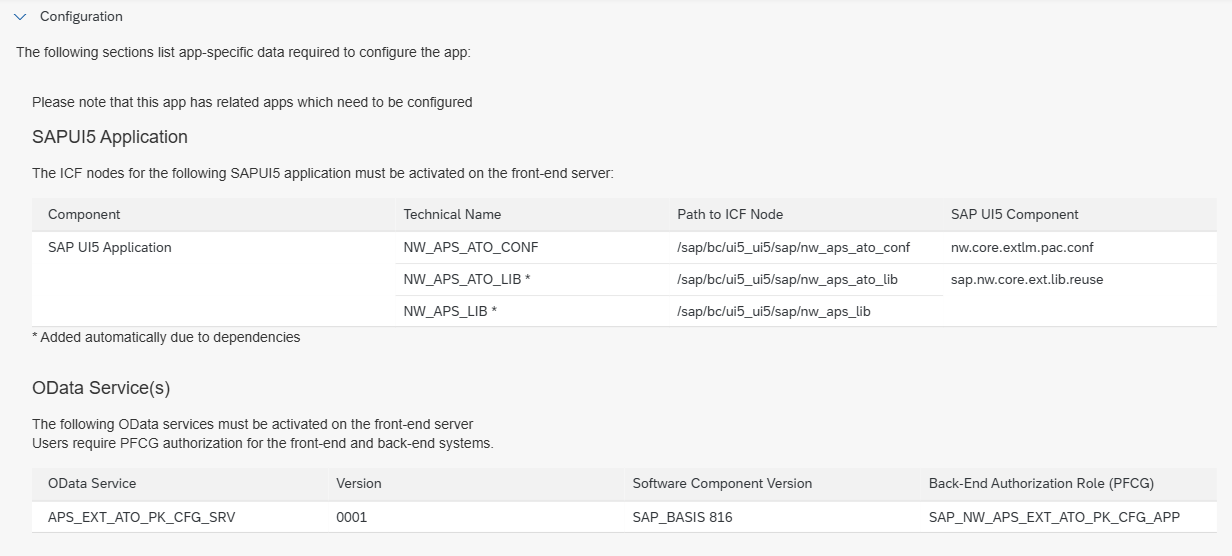
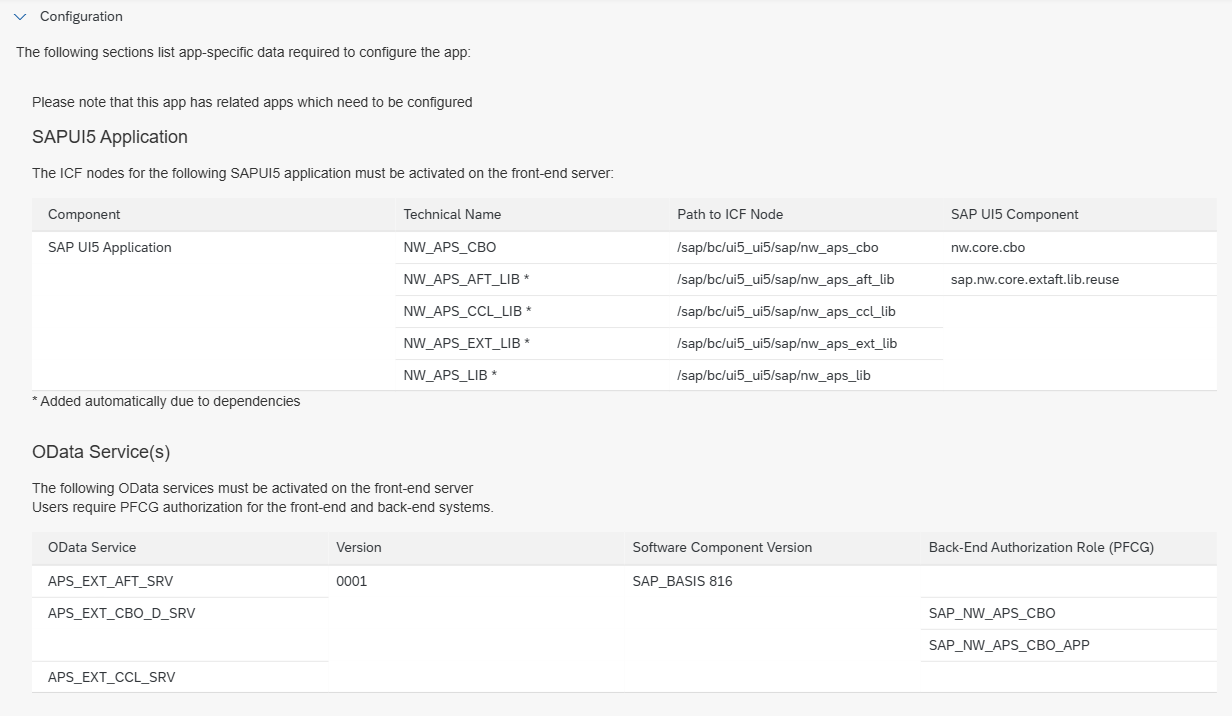
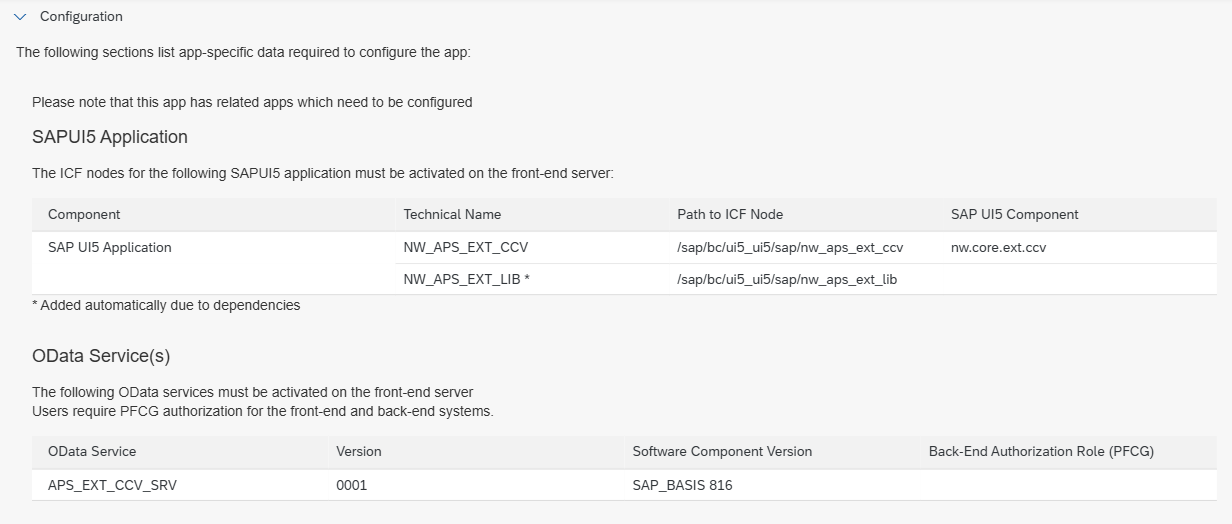
The data in the table above comes from the Configuration section, Implementation Information tab of each app (product SAP S/4HANA (Private Cloud and On-Premise), version 2025 (On-Premise)). In this version the app appears in the library as Custom CDS Views (Version 2); the old Custom CDS Views app (
nw_aps_cds_gke) is only available up to version 2023. All OData services are version0001.Each app also includes ICF nodes for libraries that the library marks with
*(“added automatically by dependencies”):nw_aps_lib,nw_aps_ext_lib,nw_aps_ato_lib,nw_aps_aft_lib,nw_aps_ccl_libandnw_aps_tra_mtr_lib. Which libraries each app needs is shown in the screenshots below (Custom Logic Tracing needs none). If the node is not active after activating the main one, activate it as well.
Configure Software Packages
Custom Business Objects
Custom CDS Views
Custom Fields and Logic (Custom Fields and Custom Logic)
Custom Logic Tracing
Custom Reusable Elements
Extensibility Inventory
Register Extensions for Transport
Maintain Translations
5. Role, space and page
-
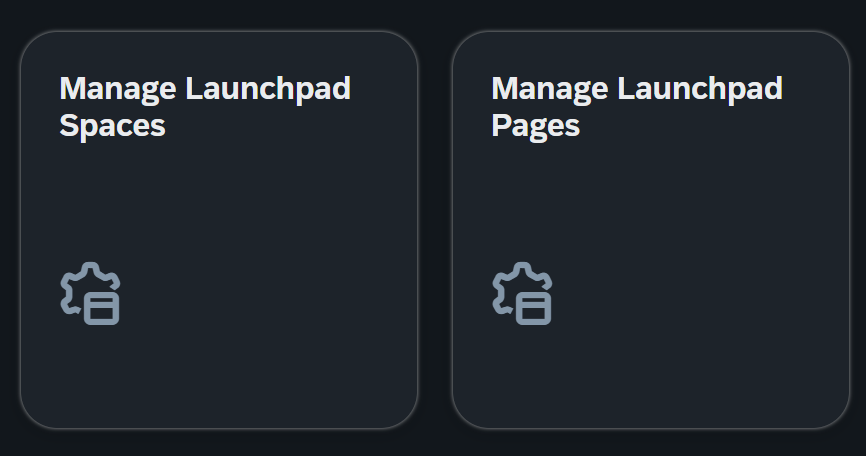
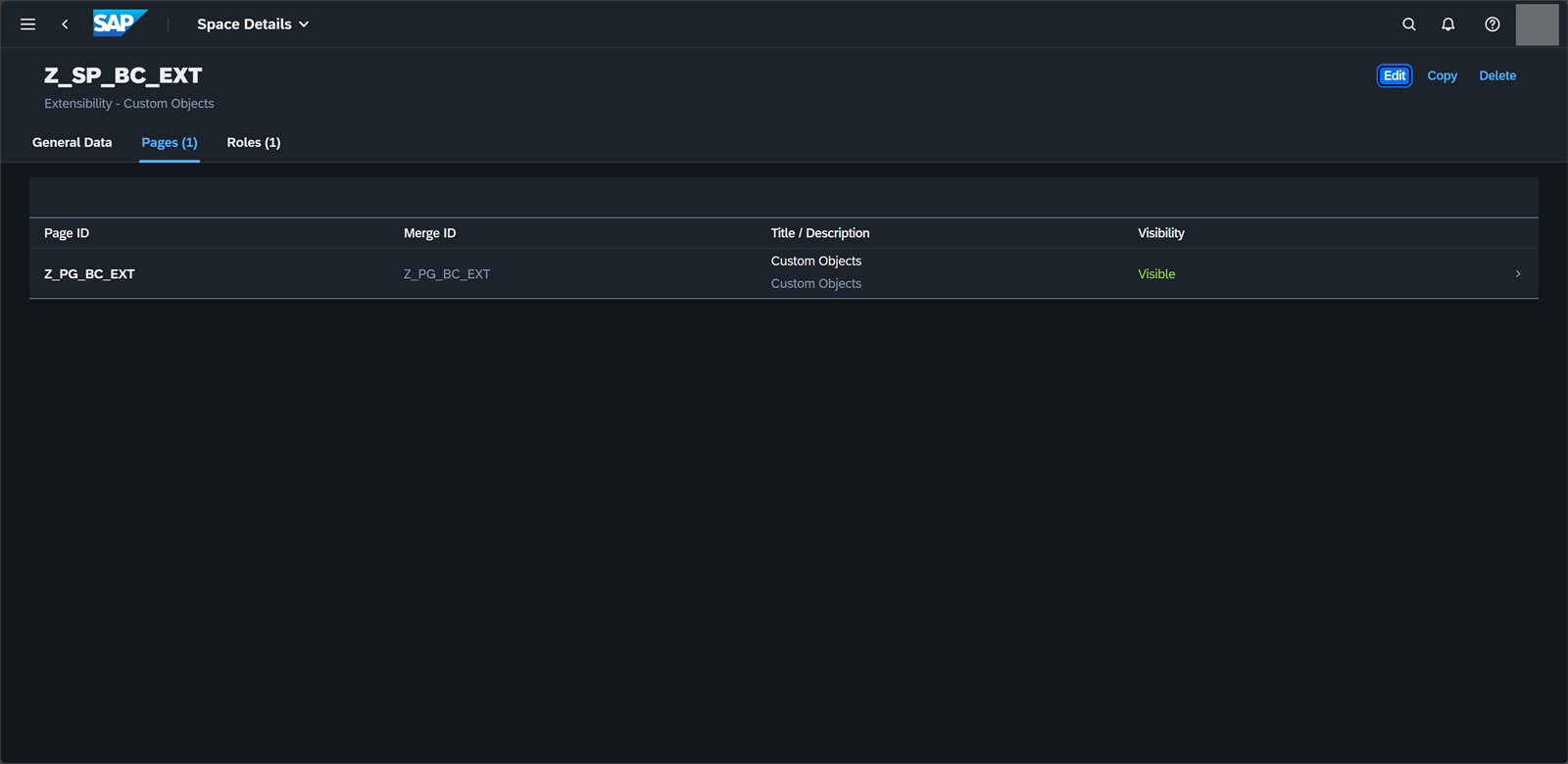
Create the page and the space Extensibility - Custom Objects with the tiles from the catalog. This action is performed from the Fiori Launchpad, using the two apps: Manage Launchpad Spaces and Manage Launchpad Pages.
-
In PFCG, create a custom role in the customer namespace (
ZorY) and assign to its menu the copied catalog (section 3) and the space created in the previous step. The role must have both the catalog and the space assigned. It is not good practice to use or modify SAP standard business roles. This step is normally performed by the Basis Security team.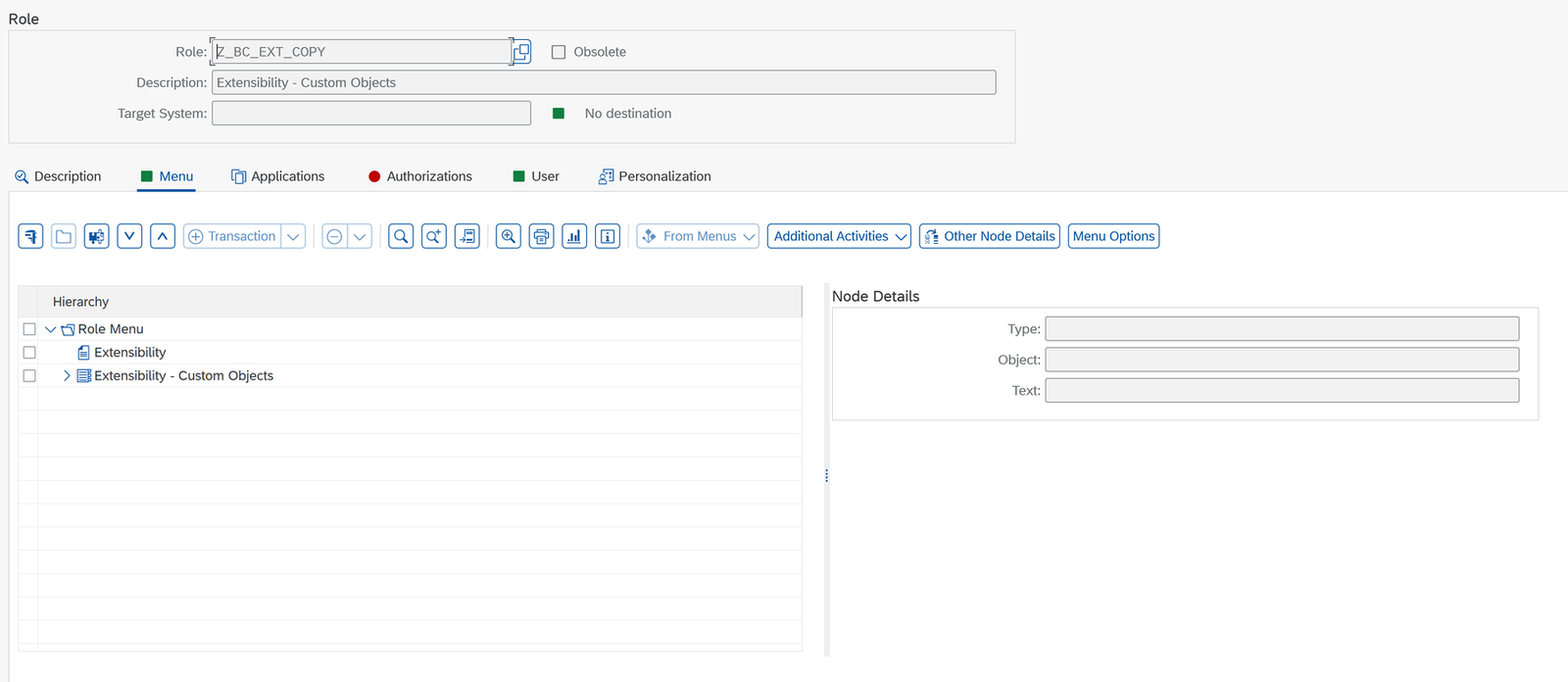
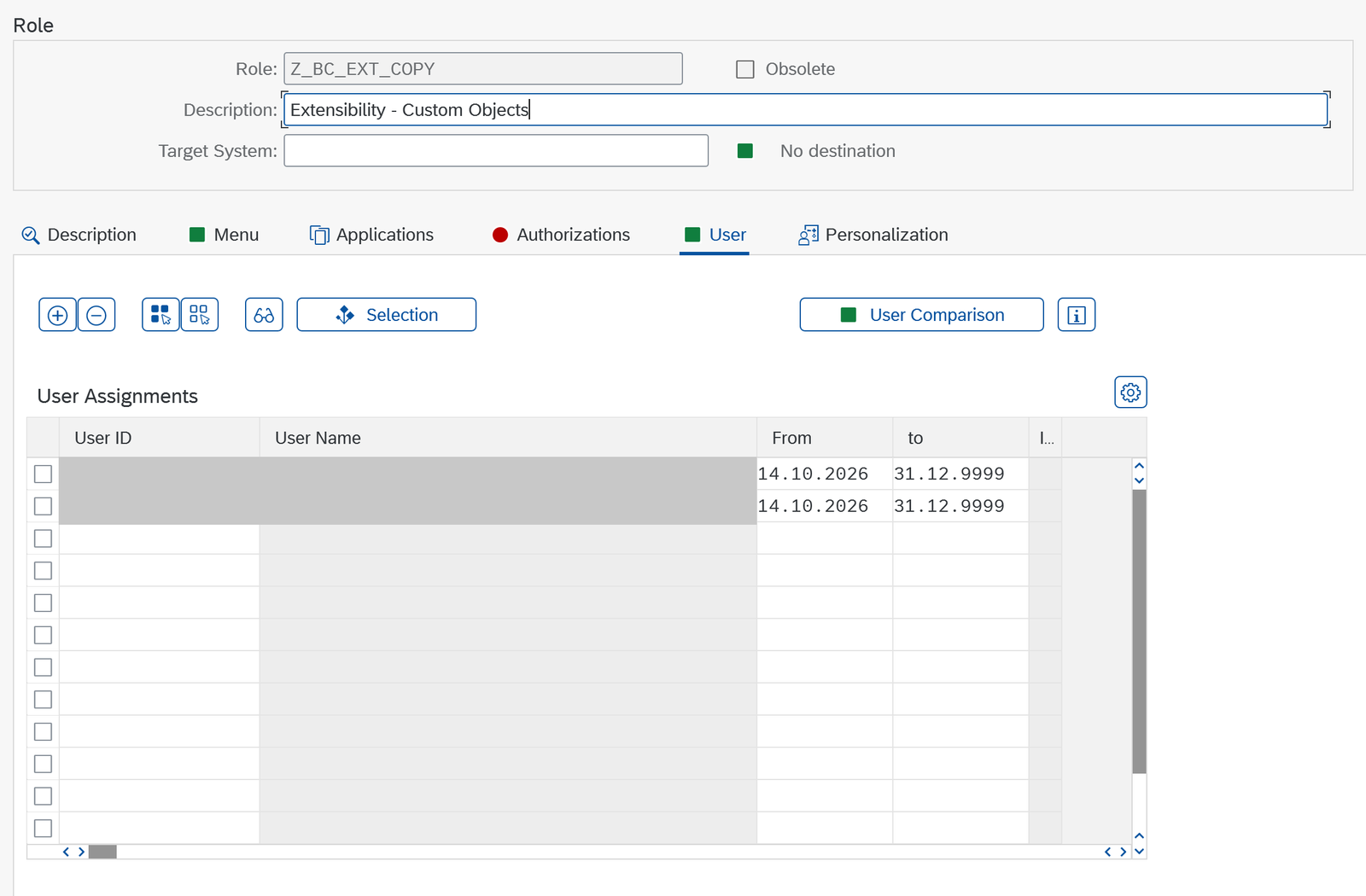
-
Assign the role to the user so that they can see the space and the tiles in the Launchpad.
6. Verification
In the Fiori Launchpad, the user must see the Extensibility - Custom Objects tab with the tiles:
- Configure Software Packages
- Custom Business Objects
- Custom CDS Views
- Custom Fields
- Custom Logic
- Custom Logic Tracing
- Custom Reusable Elements
- Extensibility Inventory
- Register Extensions for Transport
- Maintain Translations
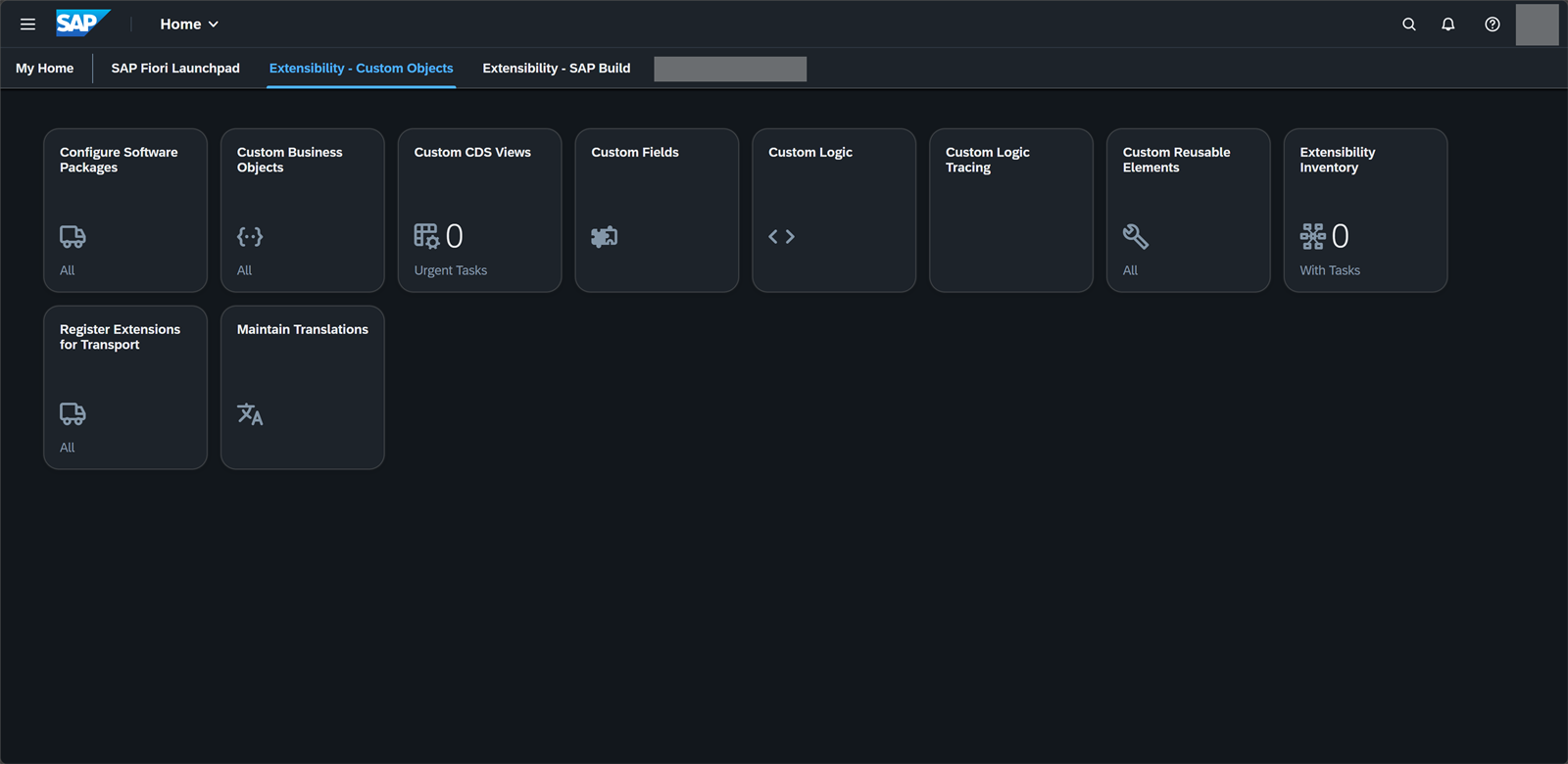
Open each app and check that it loads without errors. If it fails, check SICF, /IWFND/MAINT_SERVICE, /IWFND/ERROR_LOG and the authorizations with SU53.
References
- SAP Note 2283716
- Business catalog: SAP_BASIS_BC_EXT
- Transaction: /n/UI2/FLPCM_CUST
Was this article useful?
Thank you for your feedback.
Comments
No comments yet.